What Is Marketing Automation and How Does It Work?
What Is Marketing Automation and How Does It Work?
Digital marketing can involve hundreds or thousands of interactions between a business and its audience.
Someone may visit a website.
Another person may download a guide.
Someone else may submit a form.
A potential customer may open an email but not respond.
Another person may add a product to a cart and leave without purchasing.
Managing every interaction manually becomes difficult as a business grows.
This is where marketing automation becomes useful.
Marketing automation uses software, data, rules and workflows to automatically perform marketing activities based on customer actions, information or predefined conditions.
Instead of manually sending every email, updating every lead, segmenting every contact or following up with every prospect, businesses can create workflows that perform these actions automatically.
The goal is not simply to automate everything.
The goal is to make marketing more timely, consistent, relevant and scalable.
---
## 1. What Is Marketing Automation?
Marketing automation is the use of technology to automate repetitive marketing tasks and customer journeys.
These tasks can include:
• Sending emails
• Welcoming new subscribers
• Nurturing leads
• Segmenting contacts
• Sending reminders
• Re-engaging inactive users
• Tracking customer interactions
• Updating contact information
• Assigning leads
• Triggering follow-up messages
• Personalizing content
• Reporting campaign activity
For example, imagine someone downloads a free resume template from a website.
Instead of manually contacting that person, a marketing automation system could:
1. Record the form submission
2. Add the person to an appropriate audience
3. Send the requested resource
4. Wait for a defined period
5. Send a useful follow-up email
6. Recommend a related article
7. Track engagement
8. Move the person into another workflow based on their activity
The business creates the workflow once and the system can execute it for many users.
---
## 2. Why Do Businesses Use Marketing Automation?
Marketing automation can solve several common marketing challenges.
### Challenge 1: Repetitive work
Marketing teams often perform the same tasks repeatedly.
For example:
• Sending welcome emails
• Following up with leads
• Updating contact records
• Sending reminders
• Segmenting audiences
Automation can reduce the amount of manual work involved.
### Challenge 2: Slow follow-up
A potential customer may submit a form at 11 PM.
A manual follow-up might happen the next morning.
An automated workflow can trigger an appropriate response immediately.
### Challenge 3: Growing customer databases
A business may have 100 contacts today and 100,000 contacts later.
Manually managing every interaction does not scale easily.
Automation allows businesses to manage larger audiences using predefined workflows.
### Challenge 4: Inconsistent communication
Manual processes can result in missed follow-ups or inconsistent messaging.
Automation can help standardize specific customer journeys.
---
# 3. How Marketing Automation Works
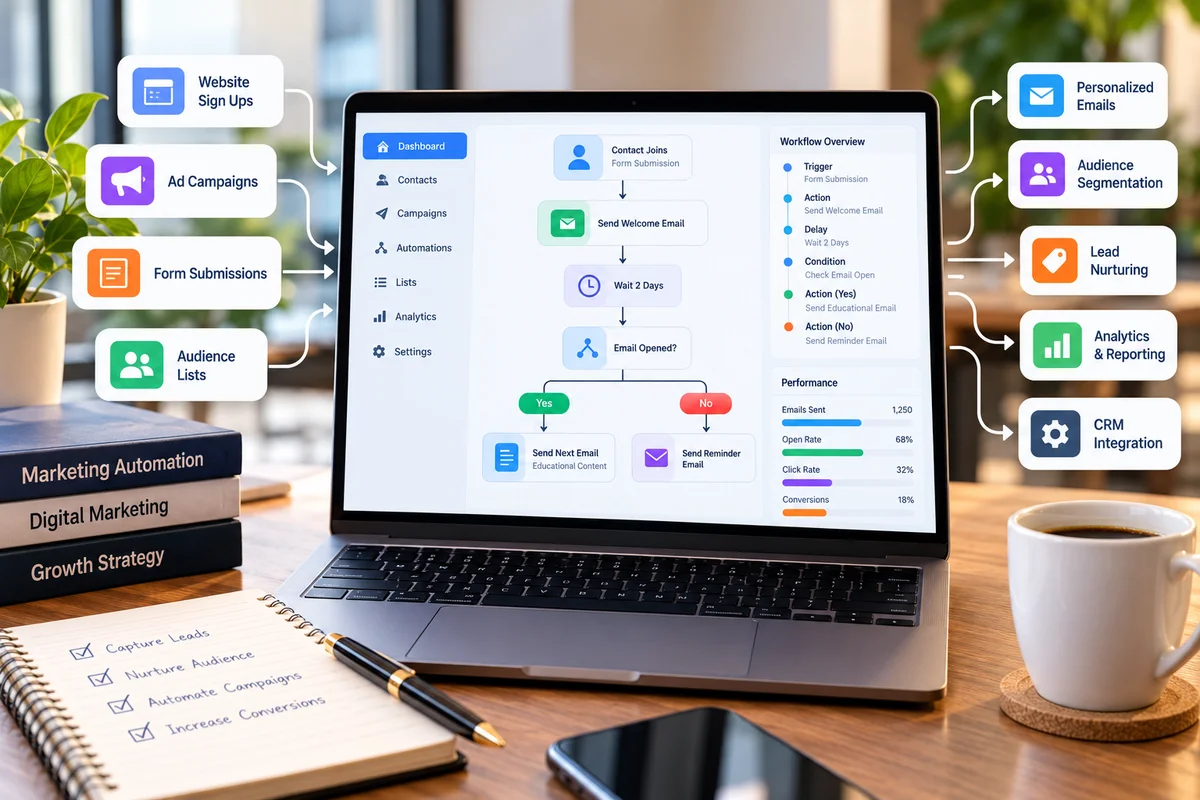
A basic marketing automation workflow usually contains several components.
### Trigger
Something happens.
Examples:
• A person submits a form
• Someone subscribes to a newsletter
• A user downloads a resource
• A customer makes a purchase
• A lead reaches a particular score
• Someone visits a particular page
### Condition
The system checks whether certain criteria are met.
For example:
"Has this person opened the previous email?"
or:
"Is this lead from the enterprise segment?"
### Action
The system performs an activity.
For example:
• Send an email
• Add a tag
• Update a contact field
• Notify a salesperson
• Add the person to another workflow
### Wait
The system waits for a predefined period.
For example:
Wait 2 days.
### Branch
The workflow can take different paths depending on user behavior.
For example:
If email opened → send next email.
If email not opened → send a different follow-up.
This creates an automated customer journey.
---
# 4. A Simple Marketing Automation Example
Imagine GoBizly offers a free interview preparation checklist.
A visitor lands on the website and submits their email address.
The automation could look like:
Visitor submits form
↓
Send checklist
↓
Wait 2 days
↓
Send interview preparation article
↓
Wait 3 days
↓
Check engagement
↓
If engaged → send interview resources
↓
If not engaged → send a different helpful email
This is a simple automated nurture sequence.
The business does not need to manually send each message.
---
# 5. Marketing Automation vs Email Marketing
Marketing automation and email marketing are related, but they are not exactly the same.
Email marketing is the broader activity of using email to communicate with an audience.
Marketing automation can use email as one component of a larger automated journey.
For example:
### Basic email marketing
A business sends:
"Here is our latest newsletter."
The same email may be sent to a broad subscriber group.
### Marketing automation
A user downloads a guide.
The system identifies the action.
It sends the guide.
Then it waits.
It checks whether the user engaged.
It sends a relevant follow-up.
The next communication may depend on the user's behavior.
Therefore, marketing automation can make email communication more behavior-driven and personalized.
---
# 6. Marketing Automation vs CRM
A CRM and marketing automation platform can work together, but they have different primary purposes.
A CRM generally helps businesses manage relationships with leads and customers.
It can contain information such as:
• Name
• Contact details
• Company
• Sales stage
• Previous interactions
• Opportunities
• Customer status
Marketing automation focuses more heavily on executing and managing marketing journeys.
For example:
CRM:
"Praveen is a marketing-qualified lead."
Marketing automation:
"Because Praveen downloaded the digital marketing guide, send the next relevant resource."
When connected properly, the two systems can work together.
Marketing activity can generate and nurture leads.
The CRM can help sales teams manage those leads and opportunities.
---
# 7. What Can Be Automated?
There are many marketing activities that can potentially be automated.
However, automation should be used selectively.
Common examples include:
### Lead Capture
Automatically record information submitted through forms.
### Welcome Emails
Automatically send a welcome message after subscription.
### Lead Nurturing
Send a sequence of useful content over time.
### Event Reminders
Send reminders before webinars, events or appointments.
### Content Recommendations
Recommend relevant resources based on user interests or actions.
### Re-Engagement
Send campaigns to contacts who have become inactive.
### Lead Assignment
Route leads to appropriate sales representatives based on predefined rules.
### Internal Notifications
Notify teams when an important action occurs.
### Customer Onboarding
Send educational or onboarding information after a customer signs up.
---
# 8. What Is a Marketing Automation Workflow?
A workflow is a predefined sequence of actions and conditions.
For example:
Trigger:
User downloads an e-book.
Action:
Send download confirmation.
Wait:
2 days.
Condition:
Did the user open the email?
If yes:
Send related article.
If no:
Send a different reminder.
Wait:
4 days.
Condition:
Did the user request a demo?
If yes:
Notify sales.
If no:
Continue nurturing.
This is a workflow.
Workflows can be simple or extremely sophisticated depending on the business and technology being used.
---
# 9. Lead Nurturing
One of the most common uses of marketing automation is lead nurturing.
Not every person who submits a form is ready to buy immediately.
A person may be:
• Researching options
• Comparing solutions
• Learning about a problem
• Evaluating prices
• Waiting for approval
• Not yet ready to purchase
Instead of immediately pushing a sales message, businesses can provide useful information over time.
For example:
Day 0:
Welcome email
Day 2:
Educational article
Day 5:
Practical guide
Day 8:
Case study
Day 12:
Product information
Day 15:
Sales consultation invitation
The exact sequence depends on the business.
The objective is to help the prospect move through the customer journey.
---
# 10. Audience Segmentation
Segmentation means dividing an audience into meaningful groups.
Instead of treating every contact exactly the same, businesses can create segments based on information or behavior.
Examples include:
• New subscribers
• Existing customers
• High-value customers
• Trial users
• Students
• Professionals
• Small businesses
• Enterprise customers
• Highly engaged users
• Inactive users
A marketing automation system can use these segments to deliver more relevant communications.
For example:
A student might receive student-focused resources.
A business owner might receive small-business content.
A previous customer might receive product education instead of introductory content.
---
# 11. Behavioral Automation
Behavior-based automation uses actions taken by users to determine what happens next.
Examples:
If someone:
• Downloads a guide
• Visits a pricing page
• Opens an email
• Clicks a specific link
• Watches a video
• Registers for an event
• Starts a trial
• Abandons a cart
the automation system can respond accordingly.
This makes marketing more contextual.
Instead of saying:
"Everyone gets the same message."
the business can say:
"This person performed a specific action, so this next message is appropriate."
---
# 12. Personalization
Marketing automation can also support personalization.
Personalization may involve:
• First name
• Industry
• Location
• Product interest
• Customer status
• Previous activity
• Content preferences
For example:
Instead of:
"Here are our latest resources."
A campaign might say:
"Here are three resources to help you prepare for your next interview."
when the user's previous behavior indicates an interest in interview preparation.
However, personalization should be useful.
Using someone's name repeatedly does not automatically make communication valuable.
The content itself should be relevant.
---
# 13. Marketing Automation for Lead Generation
Marketing automation can support the lead-generation process.
A basic lead-generation workflow might be:
Advertisement
↓
Landing page
↓
Form submission
↓
Lead created
↓
Confirmation email
↓
Lead segmentation
↓
Nurture sequence
↓
Lead qualification
↓
Sales notification
↓
Sales follow-up
Automation can reduce manual work between these stages.
However, businesses should carefully define what counts as a lead.
A form submission does not always mean a qualified sales opportunity.
---
# 14. Lead Scoring
Lead scoring assigns values or scores to leads based on predefined criteria.
For example:
Email opened = +5
Content download = +10
Pricing page visit = +15
Demo request = +30
A company visit = +10
When a lead reaches a defined score, it may be considered more sales-ready.
For example:
Score below 30:
Continue nurturing.
Score 30–60:
Marketing-qualified lead.
Score above 60:
Potential sales follow-up.
The actual scoring model should be based on the business's historical data and customer journey.
A poorly designed scoring model can create misleading results.
---
# 15. Marketing Automation and Customer Journeys
A customer journey represents the stages a person may move through while interacting with a business.
A simplified journey might look like:
Awareness
↓
Interest
↓
Consideration
↓
Conversion
↓
Onboarding
↓
Retention
↓
Advocacy
Marketing automation can support different communications at different stages.
### Awareness
Educational content.
### Interest
Guides and resources.
### Consideration
Comparisons, demonstrations or detailed information.
### Conversion
Offers, consultations or purchase prompts.
### Onboarding
Instructions and educational content.
### Retention
Useful updates and customer support content.
The automation should reflect the customer's needs at each stage.
---
# 16. Marketing Automation for E-Commerce
E-commerce businesses commonly use automation for customer journeys such as:
### Abandoned Cart
A customer adds products to a cart but does not complete the purchase.
The business may send a reminder.
### Post-Purchase
After a purchase, the system may send:
• Order information
• Product guidance
• Usage tips
• Review requests
### Replenishment
For products that are consumed regularly, a reminder may be sent around the expected repurchase period.
### Cross-Selling
Customers may receive recommendations for related products.
### Re-Engagement
Inactive customers may receive a campaign designed to bring them back.
These workflows can help businesses communicate at appropriate moments.
---
# 17. Marketing Automation for B2B
B2B marketing often involves longer sales cycles.
A potential customer may interact with a business for weeks or months before becoming a customer.
Automation can support this process by:
• Capturing leads
• Segmenting companies
• Sending educational content
• Scoring engagement
• Identifying sales-ready leads
• Notifying sales teams
• Tracking interactions
• Supporting follow-up
For example:
A visitor downloads a B2B industry report.
The system records the lead.
The lead receives relevant educational content.
The lead visits the pricing page.
The lead's engagement score increases.
The sales team receives a notification when the lead meets predefined criteria.
This creates a connection between marketing activity and sales activity.
---
# 18. Marketing Automation and CRM Integration
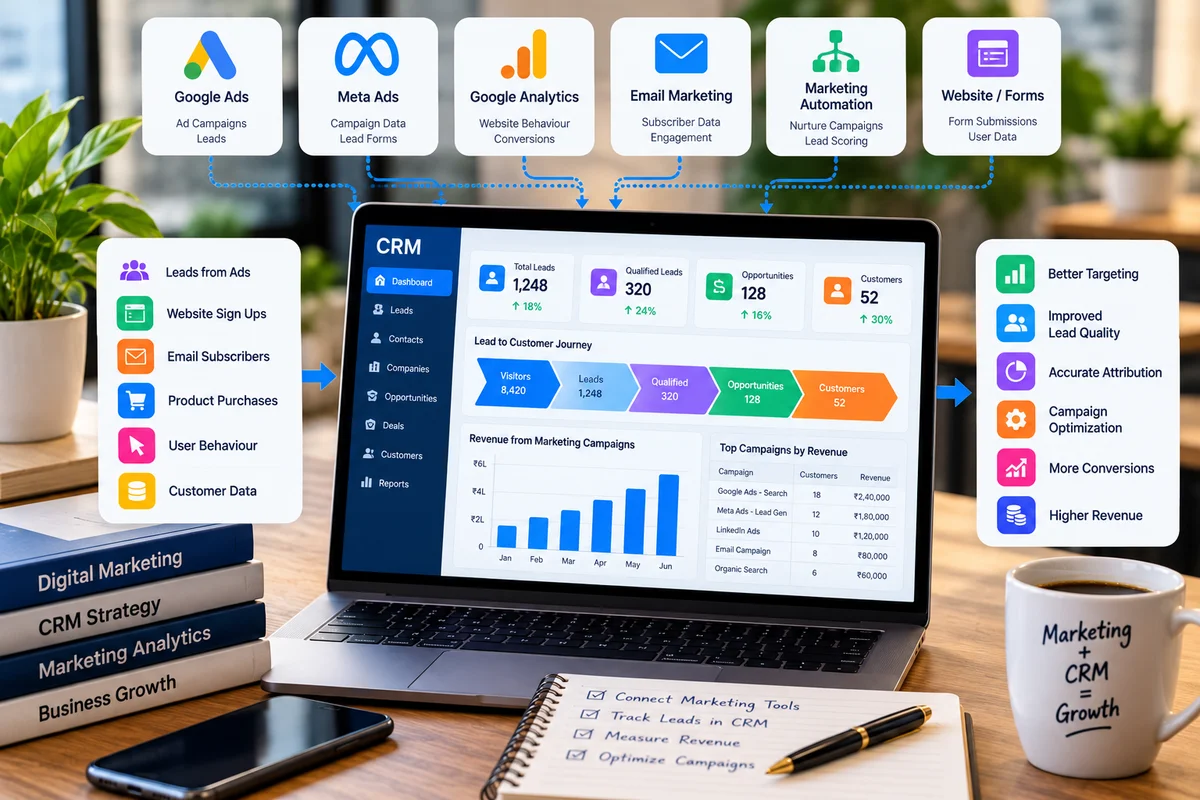
Marketing automation becomes more powerful when connected with CRM systems.
Consider a basic journey:
Advertisement
↓
Landing page
↓
Form
↓
Marketing automation
↓
CRM
↓
Sales team
↓
Opportunity
↓
Customer
The marketing system can capture and nurture the lead.
The CRM can track the sales process.
When these systems exchange appropriate information, businesses can gain a clearer view of the customer journey.
This is especially important for measuring whether marketing-generated leads eventually become customers.
---
# 19. Marketing Automation and Analytics
Automation should not operate without measurement.
Businesses should track how workflows perform.
Useful measurements can include:
• Email delivery rate
• Open rate
• Click-through rate
• Conversion rate
• Lead volume
• Lead quality
• Workflow completion
• Unsubscribe rate
• Customer conversion
• Revenue
• Customer acquisition cost
For example, if a nurture sequence generates many clicks but very few qualified leads, the business should investigate the quality and relevance of the journey.
---
# 20. Important Marketing Automation Metrics
Different workflows require different metrics.
• Delivery rate
• Open rate
• Click-through rate
• Unsubscribe rate
### Lead Generation
• Leads
• Cost per lead
• Qualified leads
• Lead-to-customer rate
### Sales
• Opportunities
• Conversion rate
• Pipeline value
• Revenue
### Customer Engagement
• Repeat purchases
• Retention
• Customer lifetime value
The most important metric depends on the purpose of the workflow.
---
# 21. Benefits of Marketing Automation
### 1. Saves Time
Repetitive tasks can be handled automatically.
### 2. Improves Consistency
Predefined workflows can help ensure that important communications are not forgotten.
### 3. Supports Personalization
Messages can be adapted based on audience information and behavior.
### 4. Scales Marketing
Businesses can manage larger audiences without increasing manual work at the same rate.
### 5. Improves Lead Nurturing
Prospects can receive useful information over time.
### 6. Helps Connect Marketing and Sales
Marketing activity can be connected to lead management and sales processes.
### 7. Enables Better Measurement
Businesses can track customer interactions throughout automated journeys.
---
# 22. Limitations of Marketing Automation
Automation is not a replacement for marketing strategy.
There are several risks.
### Poorly Designed Workflows
An automated workflow can repeatedly deliver irrelevant messages if the logic is incorrect.
### Over-Automation
Not every customer interaction should be automated.
Some situations require human communication.
### Poor Data Quality
If customer data is incorrect, automation may send inappropriate messages.
### Too Many Messages
Excessive automation can overwhelm audiences.
### Lack of Testing
A workflow that is never tested can create unexpected customer experiences.
### Weak Strategy
Technology cannot fix a poorly defined customer journey.
Automation should support strategy rather than replace it.
---
# 23. How to Avoid Over-Automation
A useful principle is:
Automate repetitive processes.
Humanize important relationships.
For example, it may make sense to automate:
• Welcome emails
• Resource delivery
• Event reminders
• Basic follow-ups
But a complex enterprise sales conversation may require a human.
Similarly, customer complaints should not simply be pushed through a generic automated sequence.
The goal should be to use automation where it improves the customer experience.
---
# 24. Common Marketing Automation Mistakes
### Mistake 1: Automating Without a Goal
Before creating a workflow, define what it is supposed to achieve.
### Mistake 2: Sending Too Many Messages
More messages do not necessarily mean better engagement.
### Mistake 3: Ignoring Segmentation
Treating every user identically can reduce relevance.
### Mistake 4: Using Poor Data
Incorrect contact information or outdated customer information can damage campaigns.
### Mistake 5: Not Testing Workflows
Test the complete journey before sending it to a large audience.
### Mistake 6: Measuring Vanity Metrics
High email opens may look positive, but the business should also examine meaningful actions.
### Mistake 7: Forgetting Human Interaction
Automation should support human teams, not eliminate necessary human conversations.
---
# 25. How to Build Your First Marketing Automation Workflow
If you are new to marketing automation, start simple.
### Step 1: Choose One Goal
For example:
"Nurture new leads."
### Step 2: Define the Audience
Example:
People who submitted a specific lead-generation form.
### Step 3: Define the Trigger
Example:
Form submission.
### Step 4: Create the First Action
Send a useful confirmation or resource.
### Step 5: Add a Wait Period
For example:
Wait two days.
### Step 6: Add Relevant Content
Send an educational article or guide.
### Step 7: Add a Behavioral Condition
For example:
Did the user click?
### Step 8: Create Different Paths
Engaged users can receive deeper content.
Inactive users can receive a different message.
### Step 9: Define the Conversion
Decide what successful completion means.
For example:
Demo request.
### Step 10: Measure Results
Review the workflow and improve it over time.
Start with one useful workflow rather than building dozens at once.
---
# 26. Example: A Simple GoBizly Learning Workflow
Imagine someone subscribes to the GoBizly newsletter.
A simple journey could be:
Subscription
↓
Welcome email
↓
Send useful learning resource
↓
Wait 3 days
↓
Send popular article
↓
Wait 4 days
↓
Recommend a relevant resource
↓
Check engagement
↓
Continue regular newsletter
If the subscriber frequently interacts with career content, future communications could become more relevant to that interest.
The objective is not to send more emails.
The objective is to provide more useful communication.
---
# 27. How Marketing Automation Fits Into the Digital Marketing Ecosystem
Marketing automation does not work in isolation.
It can interact with several other parts of digital marketing.
### Website
Provides content, landing pages and conversion opportunities.
### Advertising
Brings potential customers to the website.
### Analytics
Measures interactions and conversions.
### CRM
Manages leads, opportunities and customers.
### Email Marketing
Delivers communications.
### Content Marketing
Provides educational material for different stages of the customer journey.
### Sales
Converts qualified opportunities into customers.
A simplified ecosystem looks like:
Advertising
↓
Website
↓
Lead Capture
↓
Marketing Automation
↓
CRM
↓
Sales
↓
Customer
↓
Retention
Analytics can operate across these stages to help measure performance.
---
# 28. Marketing Automation Is Not Just Email Automation
This is an important distinction.
Email is one of the most common channels used in marketing automation, but automation can involve much more.
Depending on the platform and implementation, automation may coordinate:
• Website experiences
• Lead scoring
• CRM updates
• Audience segmentation
• Advertising audiences
• Sales notifications
• Customer onboarding
• Reporting
Therefore, marketing automation is better understood as the automation of customer journeys and marketing processes rather than simply automatic emails.
---
# 29. When Should a Business Consider Marketing Automation?
Marketing automation can become particularly useful when:
• The business has a growing lead database.
• Marketing teams repeat the same manual tasks.
• Leads require multiple follow-ups.
• Customer journeys are becoming complex.
• Sales and marketing need better coordination.
• The business wants more consistent communication.
• There is enough customer data to support meaningful segmentation.
However, a small business does not need a complicated automation system from day one.
A simple workflow can be enough to start.
---
# 30. A Practical Marketing Automation Checklist
Before launching a workflow, ask:
### Strategy
□ What is the objective?
□ Who is the audience?
□ What action triggers the workflow?
### Content
□ Is every message useful?
□ Is the content relevant to the audience?
□ Is the frequency reasonable?
### Data
□ Is the customer data accurate?
□ Are segments clearly defined?
□ Are important fields being captured?
### Technology
□ Are integrations working?
□ Are tracking and analytics configured?
□ Are CRM updates working correctly?
### Testing
□ Have all workflow paths been tested?
□ Are emails displaying correctly?
□ Are links working?
□ Are exit conditions defined?
### Measurement
□ What is the primary KPI?
□ What counts as a successful conversion?
□ How will lead quality be measured?
□ How will the workflow be improved?
---
# Conclusion
Marketing automation helps businesses use technology to manage repetitive marketing activities and customer journeys more efficiently.
It can help businesses:
• Capture leads
• Segment audiences
• Nurture prospects
• Personalize communication
• Automate follow-ups
• Connect marketing and sales
• Measure customer journeys
• Scale marketing operations
But automation should never be treated as a substitute for strategy.
The most effective approach is to begin with a clear customer journey, identify repetitive processes, create useful workflows and continuously measure the results.
Start small.
Automate a process that genuinely saves time or improves the customer experience.
Then use the data to refine it.
The goal of marketing automation is not to make marketing feel automated.
The goal is to make marketing more timely, relevant, consistent and scalable while giving marketing teams more time to focus on strategy and meaningful customer relationships.