What Is Cloud Computing? A Beginner-Friendly Guide
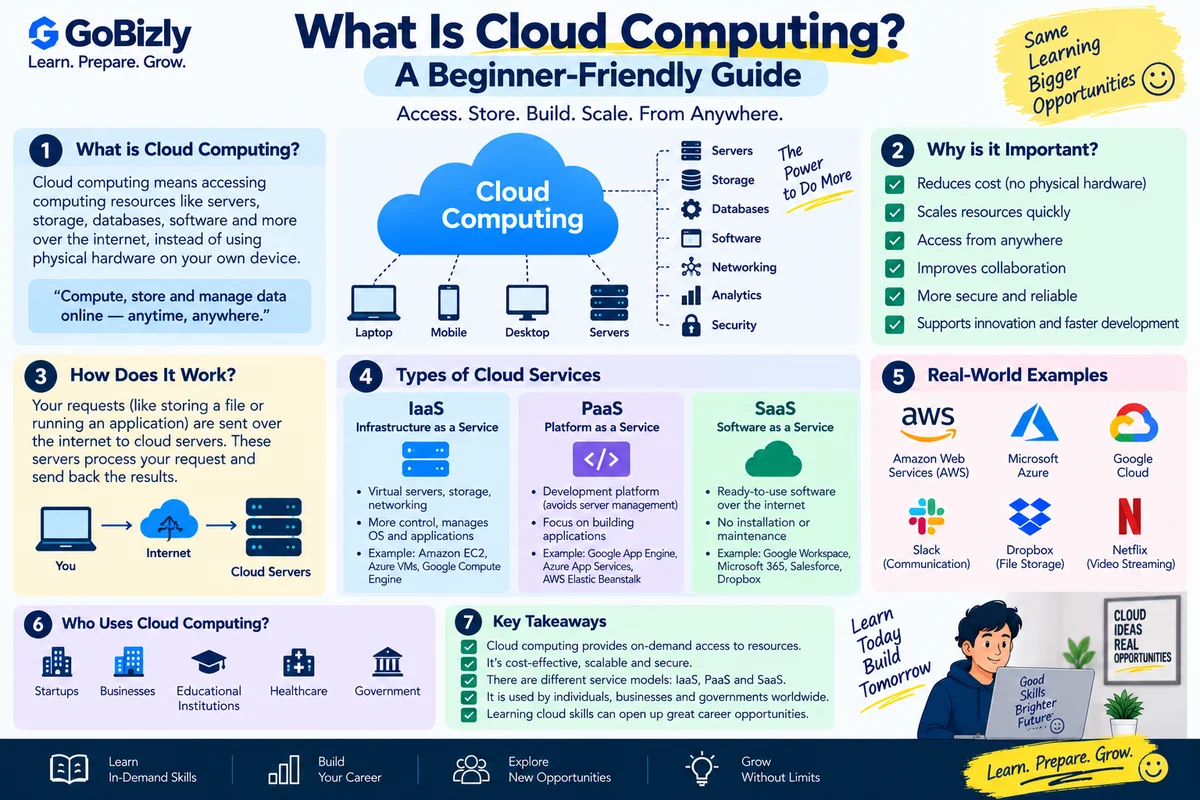
What Is Cloud Computing? A Beginner-Friendly Guide
Cloud computing is a fundamental technology concept for anyone exploring modern IT.
Instead of relying entirely on computing resources located on your own physical systems, cloud services allow organizations and individuals to access computing resources through network connections.
These resources can include:
Computing power
Storage
Databases
Networking
Software
Security services
Development tools
1. What Is Cloud Computing?
In simple terms, cloud computing is the delivery of computing resources and services over a network, commonly the internet.
Instead of purchasing and maintaining all infrastructure yourself, you can use services provided by cloud platforms.
Examples of major cloud providers include:
Amazon Web Services
Microsoft Azure
Google Cloud
2. A Simple Example
Imagine a company needs additional computing capacity for a new application.
One option is to purchase physical servers.
Another option is to use cloud infrastructure and provision computing resources through a cloud provider.
The cloud approach can provide flexibility in how resources are provisioned and managed.
3. Why Do Organizations Use Cloud Services?
Cloud services can provide access to:
Scalable resources
Managed services
Storage
Databases
Networking
Monitoring
Security tools
Organizations choose different cloud approaches based on their technical and business requirements.
4. Infrastructure as a Service
IaaS — Infrastructure as a Service
Provides infrastructure resources such as:
Virtual machines
Storage
Networking
The customer generally manages more of the software environment.
5. Platform as a Service
PaaS — Platform as a Service
Provides a platform for developing and deploying applications.
The provider manages more of the underlying infrastructure, allowing developers to focus more on application development.
6. Software as a Service
SaaS — Software as a Service
Provides software applications over a network.
Users typically access the application without managing the underlying infrastructure.
Examples can include online productivity and business applications.
7. Public Cloud
Public cloud services are provided through cloud providers and shared infrastructure environments.
Customers use resources according to the services and configurations they select.
8. Private Cloud
A private cloud environment is dedicated to a particular organization.
Organizations may choose private environments for specific operational, security or compliance requirements.
9. Hybrid Cloud
Hybrid cloud combines different environments, commonly public and private infrastructure.
Organizations may use this approach when workloads have different requirements.
10. Scalability
One major cloud concept is scalability.
An application may need more resources as usage increases.
Cloud environments can provide mechanisms for increasing or decreasing resources depending on the service and configuration.
11. Elasticity
Elasticity refers to the ability of resources to adjust in response to changing demand.
For example, an application may require more capacity during periods of high usage and less during periods of lower demand.
12. Virtual Machines
A virtual machine is a software-based computing environment that behaves like a computer.
Virtualization allows multiple virtual environments to operate on physical infrastructure.
Virtual machines are an important foundational concept in cloud computing.
13. Cloud Storage
Cloud platforms provide different forms of storage.
Storage can be used for:
Files
Application data
Backups
Media
Databases
The appropriate storage type depends on the workload.
14. Cloud Databases
Cloud platforms provide managed database services.
Depending on the service, databases may support:
Relational data
NoSQL data
Application workloads
Analytics
Understanding basic database concepts helps when learning cloud computing.
15. Regions and Availability
Cloud providers organize infrastructure into geographic regions and availability structures.
These concepts help organizations consider:
Location
Availability
Latency
Resilience
The exact terminology varies by provider.
16. Security in the Cloud
Cloud security involves multiple responsibilities.
Organizations need to consider:
Identity
Access control
Encryption
Network security
Monitoring
Data protection
Cloud providers also manage security aspects of the underlying infrastructure.
17. Shared Responsibility
Cloud security is often based on a shared-responsibility model.
The provider is responsible for certain aspects of the cloud infrastructure.
The customer remains responsible for aspects such as:
Account access
Configuration
Data
Application security
The exact responsibilities depend on the service being used.
18. Cloud Certifications
Beginners may encounter certifications from providers such as:
AWS
Microsoft Azure
Google Cloud
Before choosing one, understand the certification's level and intended audience.
A certification should complement practical learning rather than replace it.
19. How Beginners Can Start
A simple learning path is:
Cloud concepts
↓
Networking basics
↓
Linux/operating-system fundamentals
↓
One cloud platform
↓
Hands-on labs
↓
Small project
↓
Certification if useful
20. Build a Small Cloud Project
For example:
Beginner project:
Deploy a simple website or application using a cloud service.
Document:
What you built
Which services you used
How you configured them
What problem you encountered
How you solved it
This turns theoretical learning into practical experience.
Cloud Computing Checklist
☐ Understand cloud computing
☐ Learn IaaS
☐ Learn PaaS
☐ Learn SaaS
☐ Understand public cloud
☐ Understand private cloud
☐ Understand hybrid cloud
☐ Learn scalability
☐ Learn elasticity
☐ Understand virtual machines
☐ Learn cloud storage
☐ Understand databases
☐ Learn regions
☐ Learn cloud security
☐ Understand shared responsibility
☐ Practice with a cloud platform
Conclusion
Cloud computing can seem complicated because it includes many different technologies and services.
Start with the fundamentals.
Understand the service models.
Learn basic infrastructure concepts.
Choose one cloud platform.
Then gain practical experience through hands-on projects.
Learn the concepts first. Practice with real services. Build from there.
Learn. Prepare. Grow.