Web Development Guide: A Beginner's Guide to Building Websites
Web Development Guide: A Beginner's Guide to Building Websites
Websites have become an essential part of everyday life. We use them to shop, learn, communicate, work, manage finances and access countless digital services.
But have you ever wondered how a website actually works?
Behind every website is a combination of technologies that work together. HTML structures the content, CSS controls its appearance, JavaScript adds interaction, and backend systems handle data and business logic.
This guide introduces the fundamentals of web development and provides a practical roadmap for beginners.
What Is Web Development?
Web development is the process of creating and maintaining websites and web applications.
It can involve:
Designing website structures
Writing code
Creating interactive interfaces
Building backend systems
Working with databases
Connecting APIs
Testing applications
Deploying websites
Maintaining and improving web applications
Web development is generally divided into three broad areas:
Frontend development
The part users see and interact with.
Backend development
The server-side systems that process requests and handle business logic.
Full-stack development
Working with both frontend and backend technologies.
How Does a Website Work?
When you open a website, several things happen behind the scenes.
For example, you enter:
www.example.comYour browser sends a request to the appropriate server.
The server processes the request and sends information back to your browser.
The browser then interprets the files and displays the website.
A simplified flow looks like this:
User
↓
Web Browser
↓
Internet
↓
Web Server
↓
Application / Database
↓
Response
↓
Web Browser
↓
Website displayed to the user
This process usually happens within seconds.
What Is a Web Browser?
A web browser is software used to access websites.
Popular browsers include:
Google Chrome
Microsoft Edge
Mozilla Firefox
Safari
Opera
Browsers understand technologies such as HTML, CSS and JavaScript and use them to display web pages.
What Is HTML?
HTML stands for HyperText Markup Language.
HTML provides the structure of a web page.
For example:
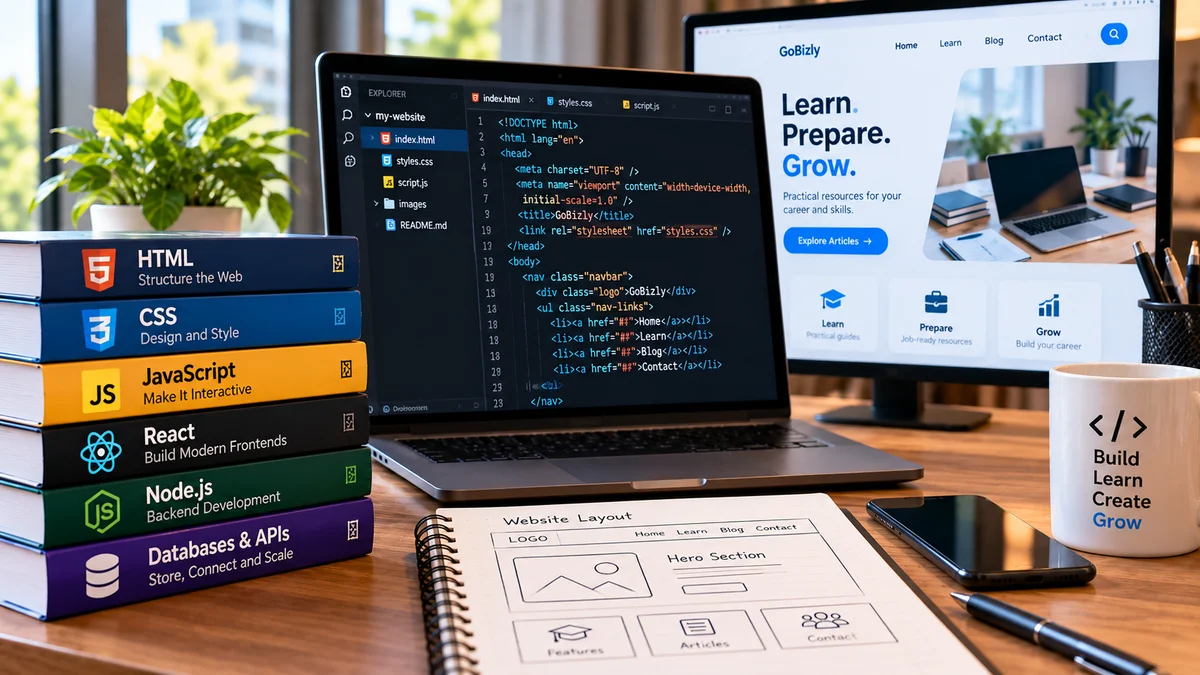
<h1>Welcome to GoBizly</h1>
<p>Learn. Prepare. Grow.</p>
Here:
<h1>represents a main heading<p>represents a paragraph
HTML can also create:
Links
Images
Lists
Tables
Forms
Buttons
Sections
Think of HTML as the structure or skeleton of a website.
What Is CSS?
CSS stands for Cascading Style Sheets.
CSS controls how HTML elements look.
For example:
h1 {
    font-size: 40px;
    margin-bottom: 20px;
}
CSS can control:
Colors
Fonts
Spacing
Layout
Borders
Backgrounds
Animations
Responsive behavior
If HTML is the structure of a house, CSS is much of the visual design.
What Is JavaScript?
JavaScript is a programming language commonly used to make websites interactive.
For example, JavaScript can respond when a user clicks a button.
document.getElementById("button").addEventListener("click", function() {
    alert("Hello!");
});
JavaScript can be used for:
Interactive menus
Form validation
Calculators
Dynamic content
Animations
Interactive dashboards
Web applications
API communication
JavaScript is one of the core technologies of modern web development.
HTML vs CSS vs JavaScript
A simple way to understand the three technologies is:
Technology | Main purpose |
|---|---|
HTML | Structure |
CSS | Presentation |
JavaScript | Behavior and interaction |
For example, imagine a button.
HTML creates the button.
CSS makes the button look attractive.
JavaScript determines what happens when someone clicks it.
Together, these technologies create an interactive web experience.
What Is Frontend Development?
Frontend development focuses on everything users see and interact with in their browser.
A frontend developer may work with:
HTML
CSS
JavaScript
Responsive design
Accessibility
Browser compatibility
Frontend frameworks and libraries
The goal is to create interfaces that are functional, accessible and easy to use.
What Are Frontend Frameworks and Libraries?
As websites become more complex, developers often use tools that make it easier to build and maintain interfaces.
Popular JavaScript-based technologies include:
React
Angular
Vue
These tools can help developers build complex user interfaces using reusable components and structured development patterns.
You don't need to learn a framework before understanding HTML, CSS and JavaScript.
For beginners, learning the fundamentals first is usually a better approach.
What Is Responsive Web Design?
People access websites from:
Desktop computers
Laptops
Tablets
Smartphones
Responsive web design allows a website to adapt to different screen sizes.
For example, a desktop website might display four cards in a row, while the same cards could appear in a single column on a smartphone.
CSS media queries are one way to create responsive layouts.
@media (max-width: 768px) {
    .container {
        width: 100%;
    }
}
A responsive website should remain usable across different devices.
What Is Backend Development?
The backend is the server-side part of a website or web application.
Users don't normally see the backend directly.
Backend systems can handle:
User accounts
Authentication
Business logic
Data processing
Database operations
Payments
API requests
Security
For example, when you log into a website, the frontend collects your login information, while backend systems may verify those credentials and determine what information you are allowed to access.
Popular Backend Technologies
Developers can build backend systems using many different technologies.
Examples include:
Python
Python is widely used for web development, automation, data and AI.
Popular Python web frameworks include:
Django
Flask
FastAPI
JavaScript / Node.js
Node.js allows JavaScript to run outside the browser and is commonly used for server-side development.
Java
Java is widely used in enterprise applications and backend systems.
PHP
PHP has been used extensively for web development and continues to power many websites.
C#
C# is commonly used with Microsoft's .NET ecosystem.
There is no single best backend language for every project. The right choice depends on the project requirements, team and technology environment.
What Is a Database?
A database stores and organizes information.
A web application might use a database to store:
User accounts
Products
Orders
Articles
Messages
Transactions
Popular database technologies include:
PostgreSQL
MySQL
Microsoft SQL Server
Oracle Database
SQLite
MongoDB
Relational databases organize data into tables, while NoSQL databases can use other data models.
What Is SQL?
SQL, or Structured Query Language, is commonly used to work with relational databases.
For example:
SELECT name, email
FROM customers
WHERE city = 'Hyderabad';
This query retrieves customers from Hyderabad.
If you're interested in learning SQL, GoBizly also has a beginner-friendly SQL for Beginners guide.
What Is an API?
API stands for Application Programming Interface.
An API allows different software systems to communicate with each other.
For example, a weather application might request weather information from a weather service through an API.
A simplified flow might look like:
Website
↓
API Request
↓
Server
↓
Database / Service
↓
API Response
↓
Website
APIs are an important part of modern web applications.
What Is HTTP?
HTTP stands for HyperText Transfer Protocol.
It is one of the fundamental protocols used for communication between browsers and web servers.
When your browser requests a web page, it communicates with the server using HTTP or HTTPS.
Common HTTP methods include:
GET— retrieve informationPOST— send informationPUT— update informationPATCH— partially update informationDELETE— remove information
What Is HTTPS?
HTTPS stands for HyperText Transfer Protocol Secure.
It uses encryption to help protect information transmitted between the browser and server.
You will commonly see HTTPS websites beginning with:
https://HTTPS is particularly important when websites handle sensitive information such as:
Login credentials
Payment information
Personal data
What Is a Domain Name?
A domain name is the human-readable address used to access a website.
For example:
gobizly.inis a domain name.
Domain names make it easier for people to access websites than remembering numerical IP addresses.
What Is Web Hosting?
A website's files need to be stored somewhere so users can access them.
Web hosting provides infrastructure for storing and serving website content.
Depending on the type of website, hosting may provide:
Server storage
Computing resources
Databases
Security features
Backups
Networking
Deployment tools
There are many different types of hosting, including shared hosting, virtual servers, dedicated servers and cloud-based hosting.
What Is a Server?
A server is a computer or computing system that provides services or resources to other devices.
For a website, a server may:
Receive a request
Process the request
Retrieve information
Communicate with a database
Generate a response
Send the response back to the browser
Modern web applications may use multiple servers and cloud services rather than relying on one physical machine.
What Is Web Development vs Web Design?
These terms are related but not identical.
Web Design
Focuses primarily on the visual and user-experience aspects of a website.
It may include:
Layout
Typography
Colors
Navigation
User experience
Visual hierarchy
Web Development
Focuses on implementing the website and making its functionality work.
It may include:
HTML
CSS
JavaScript
Backend programming
Databases
APIs
Deployment
In smaller projects, one person may handle both design and development.
What Is Full-Stack Development?
A full-stack developer works across both frontend and backend technologies.
A typical full-stack skill set might include:
Frontend
HTML → CSS → JavaScript → Framework
↓
Backend
Programming language → Framework → APIs
↓
Database
SQL / NoSQL
↓
Deployment
Hosting → Cloud → Domain → Security
Full-stack development requires a broader range of knowledge, so beginners should build their skills gradually.
Tools Web Developers Use
Web development involves more than programming languages.
Common tools include:
Code Editor
Examples:
Visual Studio Code
Sublime Text
WebStorm
Browser Developer Tools
Modern browsers provide developer tools for inspecting HTML, CSS, JavaScript and network requests.
Version Control
Git is widely used to track changes to code.
GitHub, GitLab and similar platforms can be used to host and collaborate on repositories.
Package Managers
Depending on the technology, developers may use tools such as:
npm
pip
Composer
These help manage software packages and dependencies.
What Is Git?
Git is a distributed version control system.
It allows developers to track changes in their code.
For example, you might create a new feature, discover a problem and then use Git to review or revert changes.
Common Git commands include:
git init
git add .
git commit -m "Initial commit"
git status
Git becomes especially useful when working with teams.
What Is Deployment?
Deployment means making your website or application available in an environment where users can access it.
A typical process might look like:
Write Code
↓
Test
↓
Build
↓
Deploy
↓
Monitor
↓
Improve
Depending on the project, deployment may involve cloud platforms, hosting services, domain configuration, databases and security settings.
Website Security Basics
Security should be considered from the beginning of a web project.
Important areas include:
HTTPS
Secure passwords
Authentication
Authorization
Input validation
Access control
Secure API design
Software updates
Data protection
Backups
Developers should never assume that user input is automatically safe.
For example, applications should validate and safely process information submitted through forms.
Accessibility in Web Development
A website should be usable by as many people as possible, including people who use assistive technologies.
Good accessibility practices include:
Using meaningful headings
Providing alternative text for important images
Maintaining sufficient contrast
Making navigation keyboard accessible
Using descriptive link text
Properly labeling forms
Accessibility is not simply an optional visual feature. It is an important part of building inclusive websites.
SEO and Web Development
Search engine optimization and web development are closely connected.
Technical choices can influence how search engines understand and access a website.
Important areas include:
Page titles
Meta descriptions
Heading structure
Internal links
Page speed
Mobile responsiveness
Structured data
Crawlability
Clean URLs
Image optimization
Good SEO starts with a technically sound website and useful content.
A Simple Web Development Project
A good beginner project is a personal portfolio website.
Start with three pages:
Home
Introduce yourself and explain what you do.
About
Provide background information and skills.
Projects
Showcase projects you have completed.
Start with:
HTML
↓
CSS
↓
JavaScript
↓
Responsive Design
↓
Deployment
Once the basic website works, add features such as a contact form, animations or API integration.
Common Beginner Mistakes
Trying to Learn Everything at Once
Web development is a large field.
You don't need to learn every framework, language and tool.
Start with the fundamentals.
Jumping Into Frameworks Too Early
Learning React, Angular or another framework without understanding HTML, CSS and JavaScript can make learning more difficult.
Copying Code Without Understanding It
Using examples is useful, but make sure you understand what the code does.
Ignoring Mobile Users
Always test your website on different screen sizes.
Ignoring Accessibility
Build accessible websites from the beginning rather than treating accessibility as a final step.
Not Building Projects
Reading tutorials is useful, but building websites is where your knowledge becomes practical.
Web Development Roadmap for Beginners
A practical learning path could look like this:
Stage 1 — HTML
Learn:
Elements
Attributes
Headings
Paragraphs
Links
Images
Forms
Tables
Semantic HTML
Stage 2 — CSS
Learn:
Selectors
Colors
Fonts
Box model
Flexbox
Grid
Positioning
Responsive design
Basic animations
Stage 3 — JavaScript
Learn:
Variables
Data types
Functions
Conditions
Loops
Arrays
Objects
DOM manipulation
Events
Asynchronous JavaScript
Stage 4 — Git
Learn how to:
Create repositories
Track changes
Commit code
Work with branches
Collaborate with others
Stage 5 — Frontend Development
Choose a framework or library after learning the fundamentals.
For example:
React
or
Vue
or
Angular
Stage 6 — Backend
Choose a backend technology such as:
Python + Django/FastAPI
Node.js
Java
C#/.NET
PHP
Stage 7 — Databases
Learn:
SQL
Database design
Queries
Relationships
Indexes
Basic optimization
Stage 8 — APIs and Deployment
Learn:
REST APIs
Authentication
HTTP
Deployment
Hosting
Domains
HTTPS
Basic cloud concepts
How Long Does It Take to Learn Web Development?
There is no universal timeline.
Your progress depends on:
How much time you practice
Your programming background
The type of development you want to pursue
How many projects you build
How consistently you learn
A beginner can start building simple web pages relatively quickly. Becoming comfortable enough to build complete applications takes more practice.
Instead of focusing only on how many months it takes, focus on progressively building more complex projects.
What Should You Learn First?
If you're completely new, don't start with everything listed in this guide.
A simple starting path is:
HTML
↓
CSS
↓
JavaScript
↓
Git
↓
Responsive Websites
↓
Frontend Framework
↓
Backend
↓
SQL & Databases
↓
APIs
↓
Deployment
This gives you a strong foundation without overwhelming you.
Final Thoughts
Web development is a broad field, but you don't need to understand everything before you start.
Begin with HTML, CSS and JavaScript. Build simple websites. Learn how browsers communicate with servers. Then gradually explore databases, APIs, backend development and deployment.
The most valuable skill isn't memorizing every technology. It's learning how to understand a problem, choose the right tools and build a working solution.
Learn the fundamentals. Build projects. Keep experimenting.
That's how you turn web development from something you read about into a skill you can actually use.