Prompt Engineering Basics: How to Write Better AI Prompts
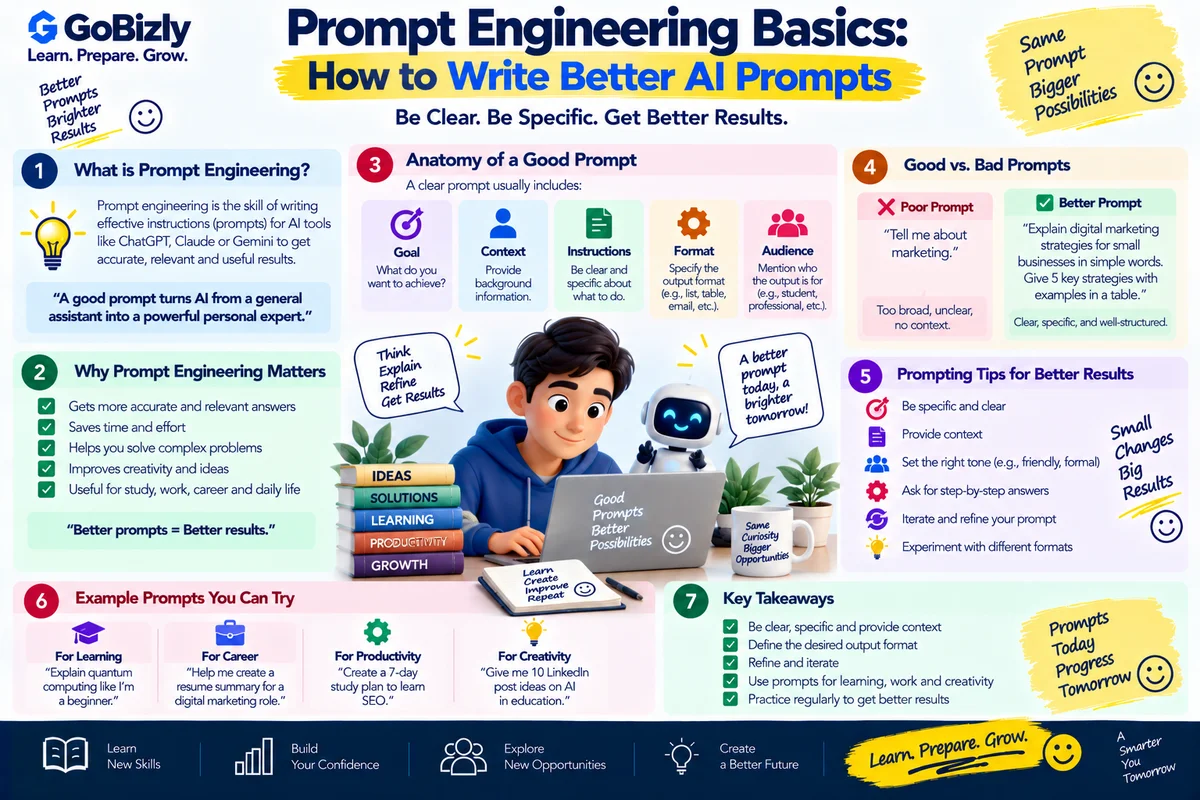
Prompt Engineering Basics: How to Write Better AI Prompts
A prompt is the instruction or input you provide to an AI system.
The quality of an AI response can depend heavily on how clearly you describe the task, context and expected output.
Prompt engineering is the practice of designing and refining instructions to get more useful results from AI systems.
You don't need complicated formulas.
Start with clarity.
1. What Is a Prompt?
A prompt can be as simple as:
"Explain SEO."
But this leaves many details unspecified.
A more useful prompt could be:
"Explain SEO to a beginner in simple language. Use five sections, include one practical example and finish with a short checklist."
The second prompt provides more direction.
2. Start With the Objective
Tell the AI what you want it to accomplish.
For example:
Explain
Summarize
Compare
Analyze
Rewrite
Brainstorm
Create
Review
Quiz
Instead of:
"Marketing"
Try:
"Explain the fundamentals of digital marketing to a college student."
3. Provide Context
Context helps the AI understand the situation.
For example:
"I'm preparing for an entry-level digital marketing interview."
This is more useful than simply asking:
"Give me marketing questions."
4. Specify the Audience
Tell the AI who the output is for.
Examples:
Beginner
Student
Fresher
Marketing manager
Technical professional
Customer
For example:
"Explain programmatic advertising to someone who understands digital marketing but has never used a DSP."
5. Add Constraints
Constraints define boundaries.
Examples:
Word count
Tone
Number of sections
Reading level
Format
Number of examples
For example:
"Explain the topic in under 500 words using simple language."
6. Specify the Output Format
You can ask for:
Table
Checklist
Bullet points
Step-by-step guide
Email
Interview Q&A
Study plan
For example:
"Create a three-column table comparing Google Ads and Meta Ads."
7. Give Examples
Examples can help communicate what you want.
For example:
"Use this style: short heading, two-sentence explanation and one practical example."
This gives the AI a pattern to follow.
8. Ask for Step-by-Step Guidance
For complex tasks, structure can help.
Instead of:
"Help me prepare for an interview."
Try:
"Create a seven-day interview preparation plan. Cover fundamentals, technical questions, scenario questions, HR questions and mock interviews."
9. Assign a Useful Role
You can provide context such as:
"Act as an interview coach."
or
"Act as a beginner-friendly digital marketing instructor."
This can help frame the response, although it doesn't guarantee expertise or accuracy.
10. Ask the AI to Ask Questions
If the task requires information you haven't provided, tell the AI to identify what's missing.
For example:
"Before creating the resume summary, ask me for the target role and three relevant achievements."
This can produce a more personalized result.
11. Use Iterative Prompting
You don't always need a perfect first prompt.
A useful workflow is:
Initial Prompt
↓
Review Response
↓
Identify What's Missing
↓
Follow-Up Prompt
↓
Refine
This is often more effective than trying to write an extremely complicated prompt immediately.
12. Ask for Alternatives
If you aren't satisfied with the first answer, ask for alternatives.
For example:
"Give me three different versions: professional, concise and conversational."
Then select the version that best fits your purpose.
13. Ask for a Review
You can provide your own draft and ask AI to evaluate it.
For example:
"Review this interview answer for clarity, relevance and structure. Don't rewrite it yet. First identify the three biggest improvements."
This can help you learn rather than simply receiving a replacement.
14. Use Structured Prompts
A useful structure is:
Role + Task + Context + Requirements + Output Format
For example:
"Act as an interview coach. Help me prepare for a digital marketing interview. I have two years of campaign operations experience. Create 15 technical questions with model answer structures in a table."
15. Verify Important Information
A well-written AI response can still contain errors.
Verify important information when dealing with:
Legal matters
Financial decisions
Medical information
Current events
Technical specifications
Academic research
Use reliable primary or authoritative sources where appropriate.
16. Don't Put Sensitive Information Into Prompts
Avoid unnecessarily sharing:
Passwords
Financial credentials
Government identification
Confidential business information
Private customer data
Use placeholders or anonymized examples where possible.
17. Build Your Own Prompt Library
Save prompts that repeatedly help you.
You could organize them into:
Learning
Explain a concept
Create a quiz
Generate flashcards
Career
Resume review
Interview practice
Job description analysis
Productivity
Meeting summaries
Task planning
Email drafting
Content
Brainstorming
Outlines
Editing
A personal prompt library can save time.
18. Example: Weak vs Strong Prompt
Weak
"Tell me about Google Ads."
Stronger
"Explain Google Ads to a beginner preparing for an entry-level digital marketing interview. Cover campaign structure, targeting, bidding, keywords, ad formats and conversion tracking. Use simple examples and finish with 10 interview questions."
The second prompt defines:
Audience
Purpose
Topics
Format
Expected outcome
19. A Simple Prompt Template
You can use:
Role: Act as a [role].
Task: Help me [objective].
Context: [relevant background].
Requirements: [important conditions].
Format: Present the answer as [format].
Audience: The content is for [audience].
You don't need every field for every task.
Use only the context that actually matters.
Prompt Engineering Checklist
☐ Define the objective
☐ Provide relevant context
☐ Specify the audience
☐ Give clear instructions
☐ Add useful constraints
☐ Specify the output format
☐ Provide examples when useful
☐ Break complex tasks into steps
☐ Review the response
☐ Refine the prompt
☐ Verify important information
☐ Protect sensitive information
Conclusion
Good prompting is largely about clear communication.
Tell the AI:
What you want → Why you need it → Who it's for → What constraints matter → How you want the output.
Then review the response and refine your instruction.
You don't need to memorize complicated prompting techniques.
Clear instructions produce a better starting point for useful AI-assisted work.
Learn. Prepare. Grow.