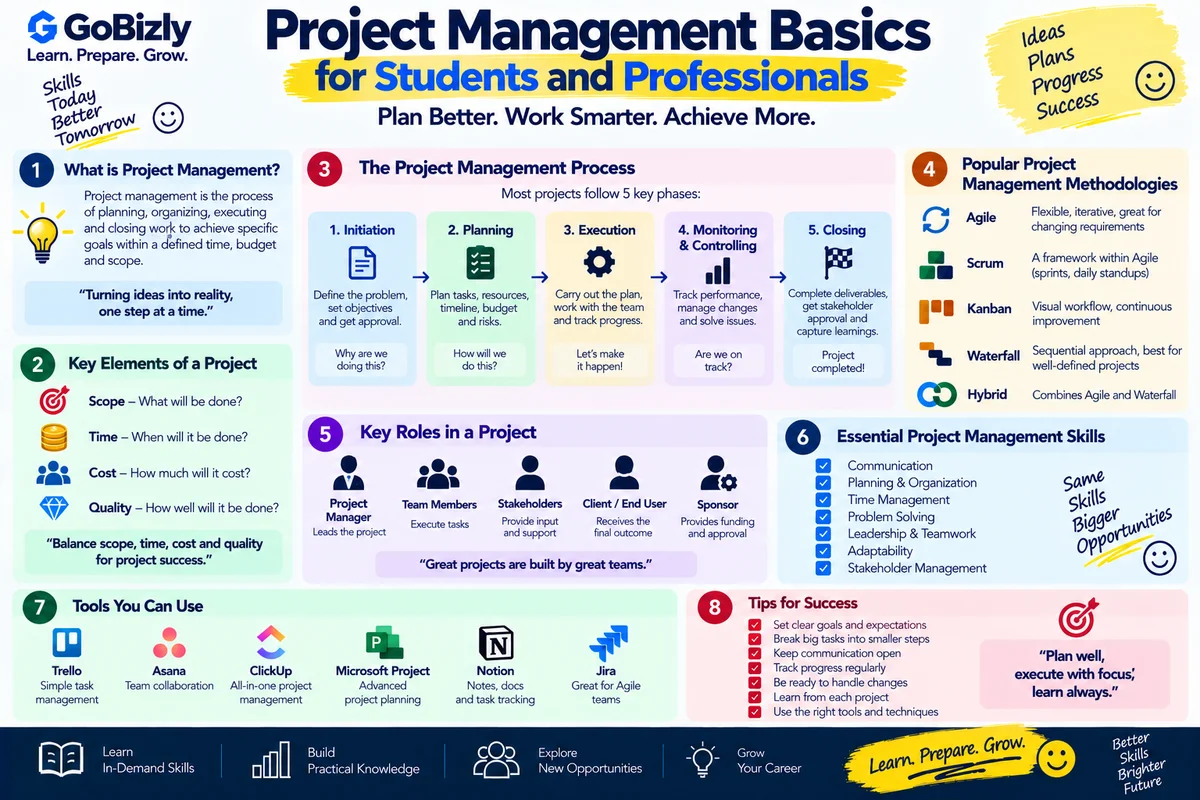
Project Management Basics for Students and Professionals
Project Management Basics for Students and Professionals
Project management isn't limited to project managers.
Students use project management when completing assignments and group projects.
Professionals use it when launching campaigns, implementing technology, organizing events or delivering client work.
The basic idea is simple:
Define → Plan → Execute → Monitor → Complete
1. What Is a Project?
A project is a temporary effort undertaken to achieve a defined objective.
Examples include:
Launching a website
Organizing an event
Implementing software
Creating a marketing campaign
Completing a college project
Projects normally have a defined goal, timeline and set of resources.
2. Define the Objective
Before starting, clearly define what needs to be achieved.
A useful objective should answer:
What are we delivering?
Why are we doing it?
Who is involved?
When should it be completed?
Unclear objectives can create confusion later.
3. Define the Scope
Scope describes what is included in the project.
For example:
Website project
Included:
Homepage
About page
Contact page
Mobile optimization
Not included:
Mobile application
Advanced customer portal
Clear scope helps prevent uncontrolled expansion of work.
4. Break the Project Into Tasks
Large projects become easier to manage when divided into smaller tasks.
For example:
Website launch
→ Content
→ Design
→ Development
→ Testing
→ SEO
→ Launch
Each major task can then be broken down further.
5. Create a Timeline
A timeline identifies when activities should happen.
It can include:
Start date
End date
Milestones
Dependencies
A simple project timeline makes progress easier to track.
6. Assign Responsibilities
Every important task should have clear ownership.
For each task, identify:
What needs to be done?
Who will do it?
When is it due?
This reduces confusion and duplicated effort.
7. Manage Resources
Projects may require:
People
Budget
Software
Equipment
Data
Time
Resource planning helps determine whether the project is realistically achievable.
8. Identify Risks
A risk is a potential event that could affect the project.
Examples:
Delayed approvals
Technical problems
Budget constraints
Resource availability
Changing requirements
Identify risks early and consider possible responses.
9. Communication
Communication is essential throughout a project.
Useful practices include:
Regular updates
Clear responsibilities
Documented decisions
Status reports
Escalation of issues
Good communication reduces misunderstandings.
10. Track Progress
Compare actual progress with the plan.
Ask:
What has been completed?
What is currently in progress?
What is delayed?
What needs attention?
Are we still within scope?
A simple tracker can be enough for small projects.
11. Manage Changes
Project requirements can change.
Instead of accepting every request immediately, evaluate:
What is changing?
Why is it changing?
What additional work is required?
Does the timeline change?
Does the budget change?
This helps maintain project control.
12. Project Completion
A project isn't finished simply because the main task is complete.
Before closing, check:
Deliverables
Testing
Documentation
Approvals
Outstanding issues
Handover
Then capture lessons learned.
13. Project Management for Students
Students can use the same principles for academic projects.
For example:
Assignment
→ Understand requirements
→ Research
→ Create outline
→ Divide tasks
→ Draft
→ Review
→ Submit
This approach can make large assignments easier to manage.
14. Project Management at Work
Professionals may manage projects involving multiple teams.
For example:
Marketing Campaign
Marketing → Creative → Analytics → Client → Launch → Reporting
Each team may have different responsibilities and deadlines.
15. Common Project Management Tools
Tools vary by organization.
Examples include:
Spreadsheets
Task management applications
Kanban boards
Project management platforms
Shared documentation systems
The tool matters less than having a clear process.
Project Management Checklist
☐ Define the objective
☐ Establish project scope
☐ Break work into tasks
☐ Create a timeline
☐ Assign ownership
☐ Plan resources
☐ Identify risks
☐ Establish communication
☐ Track progress
☐ Manage changes
☐ Complete testing
☐ Document the outcome
Conclusion
Project management is fundamentally about organizing people, tasks, resources and timelines around a specific objective.
You don't need to manage a large corporate project to develop these skills.
Start with your next college assignment, campaign, presentation or personal project.
Plan clearly. Communicate consistently. Track progress.
Learn. Prepare. Grow.