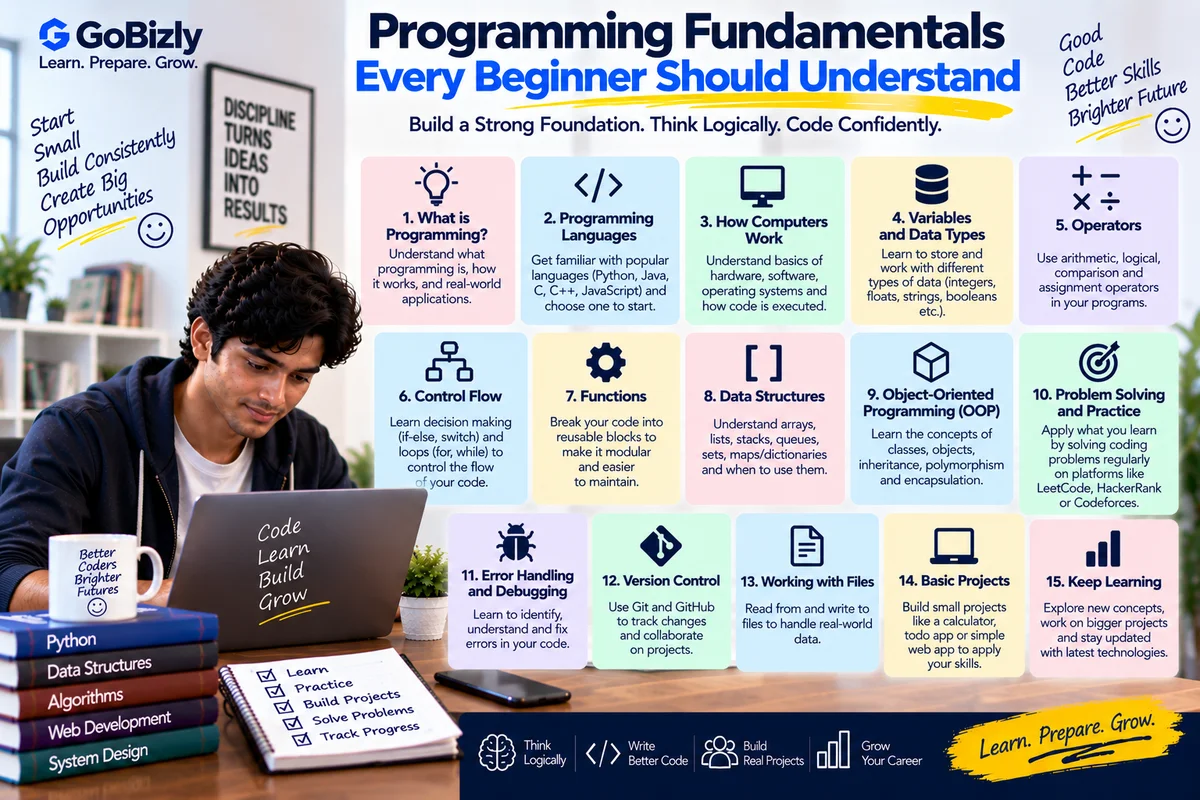
Programming Fundamentals Every Beginner Should Understand
Learning to program isn't only about memorizing syntax.
The most important step for beginners is understanding the concepts that appear across many programming languages.
These include:
Variables
Data types
Operators
Conditions
Loops
Functions
Arrays
Objects
Errors
Algorithms
Problem solving
Once these concepts become familiar, learning a specific programming language becomes easier.
1. Understand What Programming Is
Programming is the process of giving a computer instructions to perform a task.
A program takes information, processes it according to defined instructions and produces an output.
For example:
Input → Processing → Output
A calculator application follows this basic idea.
2. Variables
A variable is used to store a value that a program can work with.
For example, conceptually:
name = "Praveen"
age = 25
The exact syntax differs between programming languages.
3. Data Types
Programs work with different kinds of data.
Common types include:
Integer
Decimal/float
String
Boolean
Character
Array/list
Object
Understanding data types helps you understand what operations can be performed on different values.
4. Operators
Operators perform operations on values.
Examples include:
Arithmetic: +, -, *, /
Comparison: >, <, ==
Logical: AND, OR, NOT
The exact syntax varies by language.
5. Conditional Statements
Programs often need to make decisions.
For example:
If condition is true → do A
Otherwise → do B
Conditions are commonly implemented using:
if
else
else if
6. Loops
Loops allow a program to repeat an operation.
Common types include:
For loops
While loops
Do-while loops
For example, you might use a loop to process every item in a list.
7. Functions
A function is a reusable block of logic.
Instead of writing the same instructions repeatedly, you can create a function and call it when needed.
Functions can:
Accept inputs
Perform operations
Return results
8. Arrays and Lists
Programs often need to store multiple values.
For example:
["Apple", "Banana", "Orange"]
An array or list allows related values to be organized together.
Different languages provide different collection types.
9. Strings
Strings represent text.
Examples include:
Names
Email addresses
Product descriptions
Messages
Learn how your chosen language handles string operations such as:
Combining
Searching
Extracting
Replacing
10. Objects
Object-oriented languages often represent information using objects.
An object can contain:
Data
Properties
Methods
Understanding objects becomes important when learning object-oriented programming.
11. Errors and Exceptions
Programs don't always work perfectly.
Errors can occur because of:
Invalid input
Incorrect syntax
Missing data
Logic mistakes
System problems
Learn how your programming language identifies and handles errors.
12. Debugging
Debugging means identifying and fixing problems in a program.
A basic debugging process is:
Reproduce → Isolate → Investigate → Fix → Test
Don't immediately change random lines of code.
First understand the problem.
13. Algorithms
An algorithm is a structured sequence of steps used to solve a problem.
For example, sorting a list requires an algorithm that determines how elements should be ordered.
You don't need to memorize every algorithm immediately.
Learn how to think through problems step by step.
14. Problem Decomposition
Large problems can feel difficult.
Break them into smaller problems.
For example:
Build a website
↓
Create layout
↓
Create navigation
↓
Build individual pages
↓
Connect data
↓
Test
Breaking problems down makes them easier to manage.
15. Input and Output
Programs often interact with users or other systems.
Examples:
Input: User enters an email.
Processing: Program validates the email.
Output: Program displays a result.
Understanding this flow is fundamental.
16. Learn Version Control
If you're building projects, learn Git fundamentals.
Understand:
Repository
Commit
Branch
Merge
Pull
Push
Version control helps you track changes and collaborate.
17. Learn How APIs Work
APIs allow different software systems to communicate.
A simple conceptual flow is:
Application → API Request → Server → Response
You don't need advanced API development immediately.
Start by understanding the concept.
18. Learn Basic Databases
Many applications store information in databases.
Understand:
Tables
Records
Fields
Keys
Queries
SQL is useful for interacting with many relational databases.
19. Practice With Small Projects
Start with manageable projects.
Examples:
Calculator
To-do list
Quiz application
Expense tracker
Simple portfolio
Basic data-analysis project
The objective is to apply concepts.
20. Learn One Language Properly
Beginners often jump between languages.
Instead, choose one language and become comfortable with:
Syntax
Variables
Conditions
Loops
Functions
Data structures
Error handling
Basic projects
Then explore other languages when needed.
Programming Fundamentals Checklist
☐ Programming concepts
☐ Variables
☐ Data types
☐ Operators
☐ Conditions
☐ Loops
☐ Functions
☐ Arrays/lists
☐ Strings
☐ Objects
☐ Errors
☐ Debugging
☐ Algorithms
☐ Problem decomposition
☐ APIs
☐ Databases
☐ Version control
☐ Practical projects
Conclusion
Programming becomes easier when you understand the concepts rather than memorizing isolated syntax.
Learn the fundamentals.
Practice small problems.
Build simple projects.
Debug your mistakes.
Then gradually work toward larger applications.
Understand the logic first. The syntax becomes easier with practice.
Learn. Prepare. Grow.