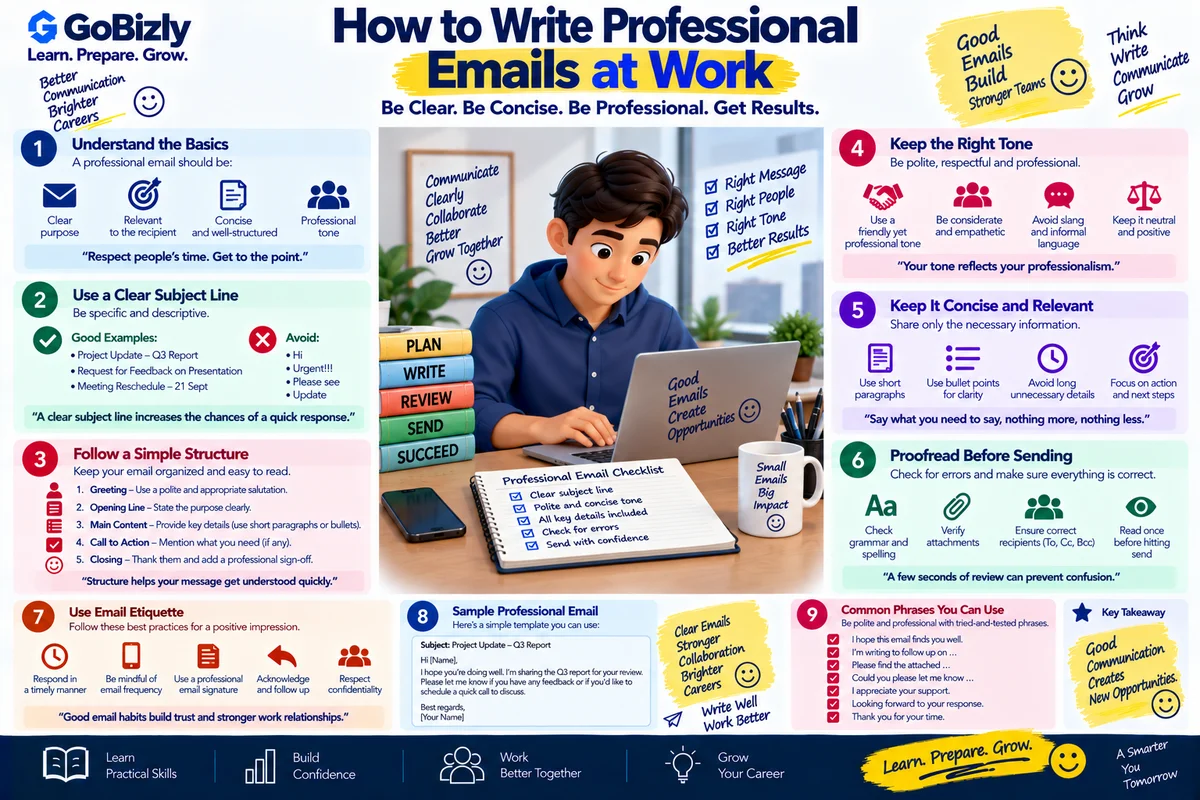
How to Write Professional Emails at Work
How to Write Professional Emails at Work
Email remains an important form of workplace communication.
A good professional email should help the recipient understand three things quickly:
Why am I receiving this?
What information do I need?
What action is expected from me?
Professional email writing isn't about using complicated words.
It is about making communication clear, concise and easy to act on.
1. Start With a Clear Subject Line
A subject line should tell the reader what the email is about.
Weak
Update
Better
Campaign Performance Report – September 21
Action-focused
Action Required: Review Campaign Report by 4 PM
A useful subject line helps the recipient prioritize the message.
2. Use an Appropriate Greeting
Common professional greetings include:
Hi Ravi,
Hello Priya,
Hi Team,
Hello everyone,
The appropriate greeting depends on the relationship and workplace culture.
3. State the Purpose Early
Don't make the reader go through several paragraphs before discovering why you're writing.
For example:
"I'm sharing the weekly campaign performance report for your review."
The purpose is immediately clear.
4. Keep the Message Structured
For longer emails, use:
Context
Details
Action Required
Deadline
For example:
The campaign completed its first week of delivery.
I've attached the performance report covering impressions, clicks and conversions.
Please review the report and confirm whether any additional analysis is required by 3 PM tomorrow.
5. Make Action Items Clear
If you need something from the recipient, say exactly what you need.
Instead of:
"Please look into this."
Write:
"Please review the conversion data and confirm whether the figures match the analytics report."
Clear requests reduce back-and-forth communication.
6. Mention Deadlines Carefully
If an action has a deadline, include it.
For example:
"Could you please share your feedback by 5 PM today?"
If the task is urgent, explain why when useful.
7. Use Professional Tone
Professional doesn't mean unnecessarily formal.
Instead of:
"Hey, send me the file ASAP."
Use:
"Hi Anil, could you please share the final file by 3 PM? We need it for the client review."
The second version is direct but respectful.
8. Avoid Very Long Paragraphs
Large blocks of text are difficult to scan.
Use:
Short paragraphs
Bullet points
Headings
Numbered lists
This is particularly useful when communicating multiple requirements.
9. Be Careful With "Reply All"
Before selecting Reply All, ask:
Does everyone need this response?
Unnecessary messages can create noise for people who don't need the information.
10. Review Attachments
Before sending an email with an attachment, check:
Is the correct file attached?
Is the latest version attached?
Does the file open?
Is the filename clear?
Does the recipient need access permission?
A simple check can prevent avoidable mistakes.
11. Follow Up Professionally
If someone hasn't responded, avoid sending:
"Why haven't you replied?"
Try:
"Hi Priya, following up on the email below regarding the campaign report. Could you please confirm whether you've had a chance to review it?"
If the matter is urgent, explain the relevant deadline.
12. Respond to Mistakes Professionally
If you send incorrect information, correct it clearly.
For example:
"Correction: The report shared earlier contained an incorrect date range. Please disregard the previous version. I've attached the corrected report."
Don't make the recipient guess which information has changed.
13. Know When Email Isn't the Best Option
Some topics are better handled through a conversation.
Consider a call or meeting when:
The issue is complex
Multiple decisions are required
The conversation is becoming lengthy
Immediate clarification is needed
After the discussion, email can still be useful for documenting decisions.
14. Email Example: Requesting Information
Subject: Request for Campaign Performance Data
Hi Anil,
Could you please share the campaign performance data for September 15–20?
Please include:
Impressions
Clicks
Conversions
Spend
CPA
If possible, please share the report by 2 PM today.
Thanks,
Praveen
15. Email Example: Status Update
Subject: Campaign Launch – Status Update
Hi Team,
Sharing a quick update on the campaign launch.
Campaign setup: Completed
Creative approval: Completed
Tracking validation: Completed
Launch: Completed
I'll monitor delivery and share the initial performance update tomorrow.
Thanks,
Praveen
16. Email Example: Interview Follow-Up
Subject: Thank You – Digital Marketing Interview
Hi [Name],
Thank you for taking the time to speak with me today about the Digital Marketing role.
I appreciated the opportunity to discuss the position and learn more about the team and responsibilities.
Please let me know if you need any additional information from my side.
Best regards,
[Your Name]
17. Common Email Mistakes
Avoid:
Unclear subject lines
Extremely long paragraphs
Excessive punctuation
Informal language in formal situations
Missing attachments
Unclear requests
Unnecessary recipients
Sending without proofreading
Professional Email Checklist
Before clicking Send, check:
☐ Clear subject
☐ Appropriate greeting
☐ Purpose stated early
☐ Relevant information included
☐ Action clearly defined
☐ Deadline mentioned if needed
☐ Appropriate tone
☐ Attachments checked
☐ Recipients checked
☐ Grammar reviewed
☐ Confidential information handled appropriately
Conclusion
A professional email should make the recipient's job easier.
Be clear about the purpose, provide the necessary context and make any required action obvious.
Write so the reader knows what happened, what matters and what needs to happen next.
Learn. Prepare. Grow.