How to Prepare for a Technical Interview
How to Prepare for a Technical Interview
Technical interviews can feel difficult because the questions can vary significantly by role.
A software developer may face programming and database questions.
A data analyst may need to discuss SQL, Excel and analytical concepts.
A digital marketing professional may be asked about advertising platforms, analytics and campaign measurement.
The preparation strategy should therefore begin with understanding the specific role.
1. Start With the Job Description
Review the technical requirements.
Identify:
Tools
Platforms
Programming languages
Technical concepts
Certifications
Responsibilities
Create a preparation list based on what the role actually requires.
2. Review the Fundamentals
Before studying advanced topics, make sure you understand the basics.
For example:
Data Role
Excel
SQL
Data analysis
Basic statistics
Marketing Role
Campaign structure
Analytics
Tracking
Optimization
Reporting
Software Role
Programming fundamentals
Data structures
Databases
APIs
The exact requirements vary by role.
3. Understand Every Skill on Your Resume
If your resume says you know a tool, expect questions about it.
For example, if you mention:
Google Analytics
you should be prepared to explain what you've used it for.
If you mention:
SQL
be prepared for questions involving basic queries and concepts.
Only list skills you can genuinely discuss.
4. Prepare Conceptual Questions
Technical interviews may include questions such as:
What is...?
How does it work?
Why would you use it?
What is the difference between X and Y?
Don't only memorize definitions.
Try to understand the underlying concept.
5. Prepare Practical Questions
You may also be asked:
"How would you solve this problem?"
or:
"What would you do if this stopped working?"
These questions test how you apply knowledge.
Use a structured approach:
Understand → Analyze → Solve → Validate
6. Practice Troubleshooting
For technical or operations roles, troubleshooting can be important.
A basic framework is:
Reproduce → Check configuration → Identify the change → Isolate the issue → Fix → Test → Monitor
Adapt the framework to the technology you're discussing.
7. Prepare Your Projects
Technical interviews frequently use projects to explore practical knowledge.
Know:
Objective
Architecture or process
Tools
Your contribution
Challenges
Decisions
Results
Lessons learned
Be especially clear about what you personally worked on.
8. Explain Technical Concepts Simply
Interviewers may ask you to explain a technical concept to someone without a technical background.
Practice explaining concepts using:
Definition → How it works → Example → Why it matters
This demonstrates both knowledge and communication.
9. Practice Technical Comparisons
Prepare common comparison questions.
Examples:
SQL vs NoSQL
Google Ads vs DSP
GA4 vs Universal Analytics
DV360 vs CM360
Frontend vs Backend
The exact comparisons depend on the role.
10. Practice With Realistic Questions
Don't only read questions.
Try answering them aloud.
For each question:
Understand it.
Think about the concept.
Structure the answer.
Give an example.
Check whether you actually answered the question.
11. Prepare for Scenario Questions
Scenario questions can begin with:
"What would you do if..."
For example:
"What would you do if campaign performance suddenly dropped?"
A useful approach:
Clarify → Investigate → Identify cause → Take action → Validate → Monitor
Explain why you would take each step.
12. Review Recent Work
If you're experienced, review projects and responsibilities from your recent roles.
Interviewers may ask:
What did you work on?
What tools did you use?
What problems did you encounter?
How did you solve them?
What did you learn?
Use real examples.
13. Practice Without Tools
If an interview environment doesn't allow external tools, be prepared to explain your reasoning without relying on them.
For coding or analytical roles, practice solving representative problems manually where appropriate.
14. Don't Memorize Definitions
Memorized definitions can be useful as a starting point.
But interviewers may immediately ask:
"Can you give me an example?"
or:
"How would you use it?"
Understanding is more useful than memorizing isolated sentences.
15. Prepare for Follow-Up Questions
A simple answer can lead to several follow-ups.
For example:
Question: What is Google Tag Manager?
Follow-up: Why would you use it?
Follow-up: What is a data layer?
Follow-up: What is a trigger?
Follow-up: How would you troubleshoot a tag?
Prepare the connected concepts, not just one definition.
16. Review Your Weak Areas
Create three lists:
Strong
Need Practice
Need to Learn
Spend most of your preparation time on the second category while maintaining your strengths.
17. Use a Mock Interview
Ask someone to conduct a mock interview.
Include:
Fundamentals
Practical questions
Scenarios
Resume questions
Follow-ups
Ask for feedback on both knowledge and communication.
18. Practice Explaining Your Thinking
When solving a problem, don't immediately give the final answer.
Explain your reasoning.
For example:
"First, I'd verify whether the issue is affecting all users or only a specific segment. Then I'd check when the change began and compare the configuration before and after that point."
This shows your approach.
19. Prepare Questions for the Interviewer
You can ask:
What technologies does the team use?
What would I work on initially?
What technical skills are most important?
How does the team approach testing and troubleshooting?
What does the learning process look like?
Choose questions appropriate to the role.
20. Create a Final Review Sheet
Before the interview, prepare one page containing:
Key concepts
Important tools
Common questions
Projects
Troubleshooting frameworks
Areas to review
Questions for interviewer
Use this for final revision.
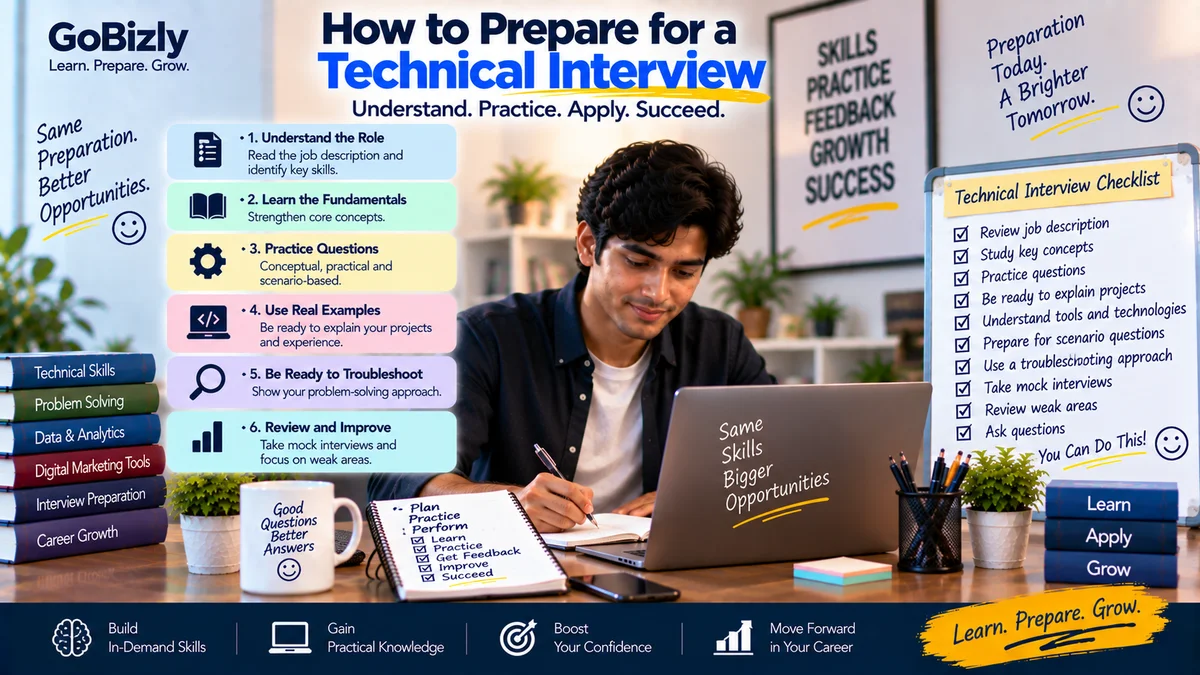
Technical Interview Checklist
☐ Review job description
☐ Identify required skills
☐ Review fundamentals
☐ Understand resume skills
☐ Practice conceptual questions
☐ Practice practical questions
☐ Review projects
☐ Practice troubleshooting
☐ Prepare scenarios
☐ Practice explaining concepts
☐ Prepare follow-up questions
☐ Conduct mock interview
☐ Review weak areas
☐ Prepare final revision sheet
Conclusion
Technical interview preparation is not about memorizing every possible question.
Start with the role.
Understand the fundamentals.
Practice applying concepts.
Know your projects.
Prepare for scenarios and follow-up questions.
Most importantly, practice explaining how you think, not just what you know.
Understand the concept. Practice the application. Explain your reasoning.
Learn. Prepare. Grow.