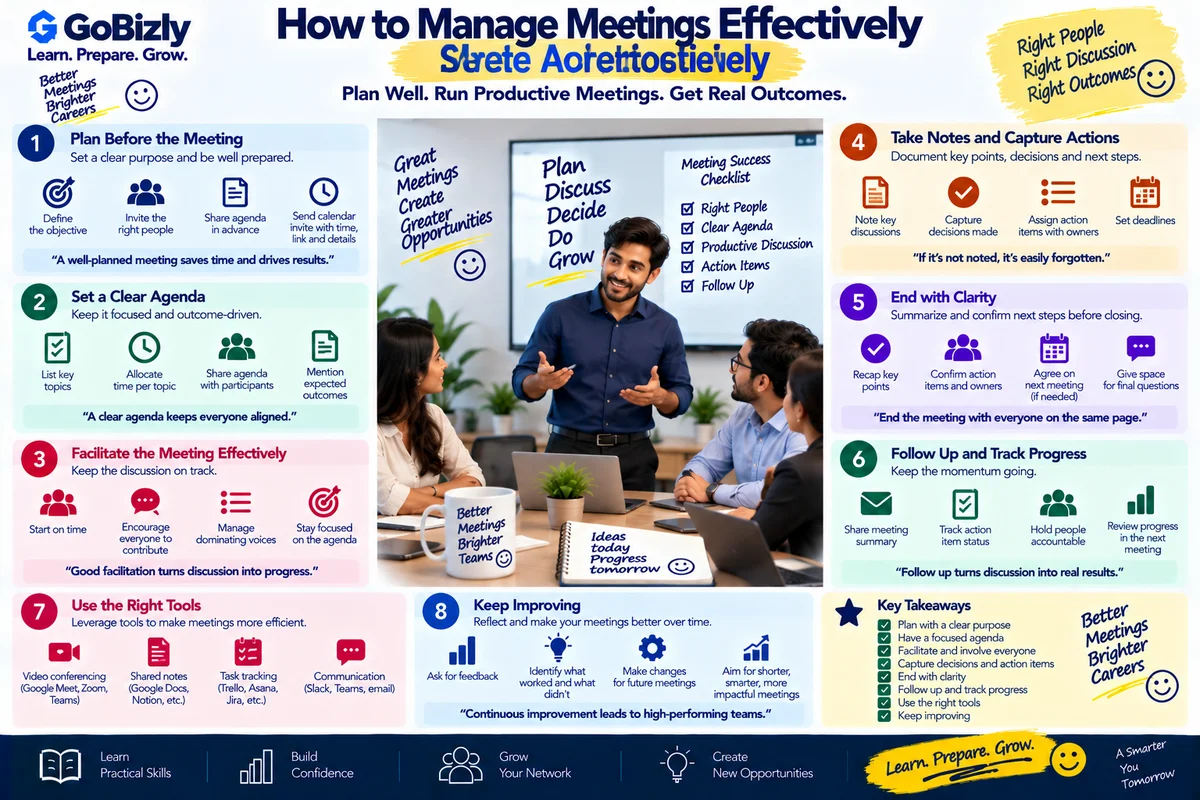
How to Manage Meetings Effectively
How to Manage Meetings Effectively
Meetings can help teams make decisions, solve problems, share information and coordinate work.
But meetings can also become inefficient when there is no clear objective, too many participants or no follow-up.
An effective meeting should answer:
Why are we meeting?
What needs to be discussed or decided?
Who needs to participate?
What happens after the meeting?
1. Decide Whether a Meeting Is Necessary
Before scheduling a meeting, consider whether the objective can be achieved through:
Email
Chat
Shared documentation
A project management tool
A meeting is often useful when discussion, collaboration or decision-making is required.
2. Define the Meeting Objective
A meeting objective should be specific.
Weak
"Project discussion"
Better
"Review the website launch status, identify remaining blockers and confirm launch responsibilities."
The second objective gives participants a clear reason to attend.
3. Invite the Right People
Not everyone needs to attend every meeting.
Invite people who:
Need to provide information
Need to make decisions
Own relevant tasks
Are directly affected by the outcome
If someone only needs the final decision, a summary may be sufficient.
4. Create an Agenda
A simple agenda might include:
1. Project status — 10 minutes
2. Current blockers — 15 minutes
3. Decisions required — 15 minutes
4. Next steps — 10 minutes
An agenda helps participants prepare and keeps the conversation focused.
5. Share Relevant Information Beforehand
If participants need to review a document, report or presentation, share it before the meeting whenever possible.
This prevents the entire meeting from being spent reading information for the first time.
6. Start on Time
Starting on time demonstrates respect for participants.
If someone is missing, decide whether their presence is essential.
Don't automatically delay every meeting because one participant hasn't joined.
7. Keep the Discussion Focused
A discussion can easily move into unrelated topics.
When that happens, you can say:
"That's an important point. Let's capture it as a separate action and return to the current topic."
This keeps the meeting moving without dismissing the issue.
8. Encourage Participation
A meeting shouldn't be dominated by one person.
Invite relevant participants to contribute.
For example:
"Ravi, you've been working on the analytics implementation. Could you share the current status?"
This helps ensure important information isn't missed.
9. Manage Disagreement
When participants disagree, bring the discussion back to:
Evidence
Objectives
Constraints
Available options
Business impact
Try to move from:
"I don't agree."
toward:
"What evidence supports each option, and which approach best meets the project objective?"
10. Manage Time
If an agenda item is taking too long, decide whether to:
Continue
Move it to a separate meeting
Assign an owner to investigate
Make a decision with available information
Don't allow one topic to consume the entire meeting unless it is genuinely the priority.
11. Capture Decisions
Important decisions should be documented.
For example:
Decision: Launch will move to September 25.
Owner: Marketing team
Dependency: Final creative approval
This reduces later confusion.
12. Capture Action Items
Every action item should ideally have:
Task + Owner + Deadline
For example:
Action | Owner | Deadline |
|---|---|---|
Validate tracking | Analytics Team | Sept 23 |
Approve creatives | Marketing | Sept 24 |
Prepare launch report | Campaign Team | Sept 25 |
13. Distinguish Actions From Discussions
A discussion doesn't automatically create an action.
At the end of each topic, ask:
What have we decided?
Is there an action?
Who owns it?
When is it due?
This makes follow-up much easier.
14. End With a Summary
Before closing, summarize:
Key decisions
Open issues
Action items
Owners
Deadlines
Next meeting, if required
For example:
"To summarize, the tracking issue will be validated by the analytics team tomorrow, creative approval is due Thursday and the campaign launch remains scheduled for Friday."
15. Send a Follow-Up
A short follow-up message can include:
Decisions
Action Items
Owners
Deadlines
Next Steps
This creates a written record.
16. Virtual Meeting Best Practices
For online meetings:
Test your microphone
Join on time
Use a stable connection when possible
Mute when not speaking
Share your screen only when necessary
Avoid multitasking
Keep documents ready
If the meeting is important, have a backup plan for technical issues.
17. When to End a Meeting Early
If the objective has been achieved, there is no requirement to use every minute that was scheduled.
If all decisions are made and actions are clear:
"We've covered everything on the agenda, so we can close here."
Ending early can give participants time back.
18. Measure Meeting Effectiveness
After important meetings, ask:
Did we achieve the objective?
Were the right people present?
Did we make the required decisions?
Are actions clearly assigned?
Was the meeting longer than necessary?
Use this feedback to improve future meetings.
Meeting Management Checklist
Before the Meeting
☐ Decide whether a meeting is necessary
☐ Define the objective
☐ Invite relevant participants
☐ Create an agenda
☐ Share required documents
During the Meeting
☐ Start on time
☐ Follow the agenda
☐ Encourage relevant participation
☐ Manage disagreements constructively
☐ Track decisions
☐ Record action items
After the Meeting
☐ Summarize decisions
☐ Assign owners
☐ Confirm deadlines
☐ Send follow-up
☐ Track outstanding actions
Conclusion
An effective meeting isn't measured by how long it lasts.
It is measured by whether the right people used their time to achieve a clear objective and leave with clear next steps.
Prepare before the meeting, stay focused during it and follow up afterward.
Learn. Prepare. Grow.