How to Build a LinkedIn Profile That Attracts Opportunities
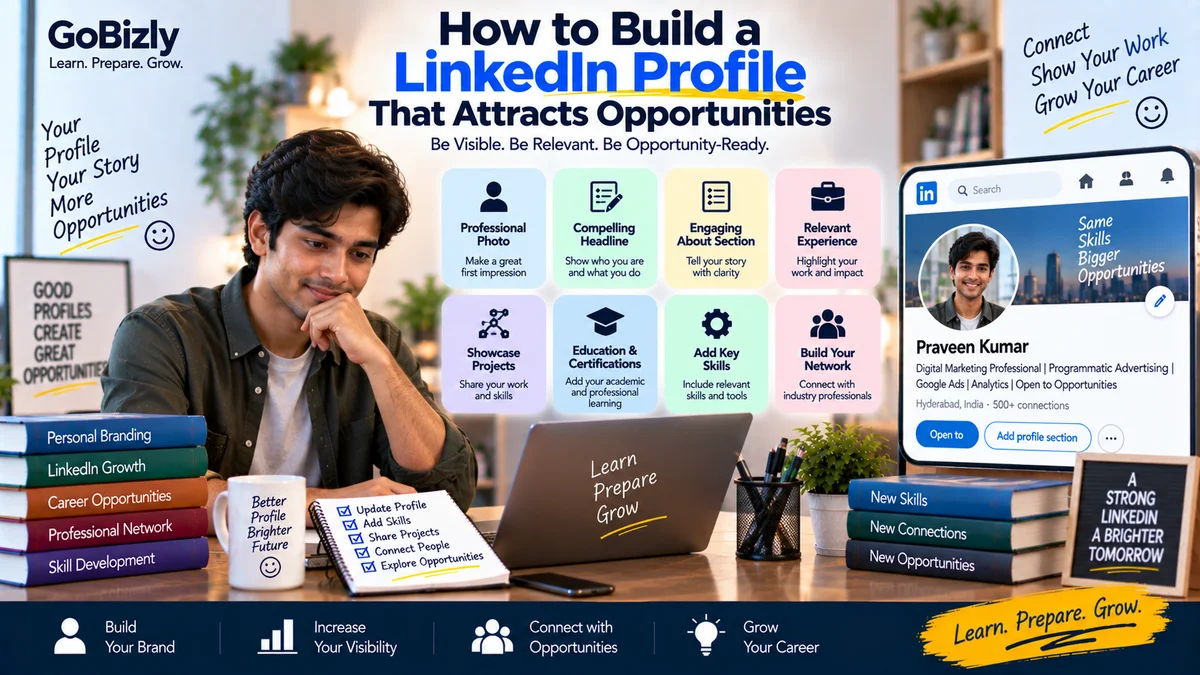
How to Build a LinkedIn Profile That Attracts Opportunities
LinkedIn can be more than an online version of your resume.
A well-structured profile can help you communicate:
Who you are
What you do
What skills you have
What type of opportunities interest you
What experience or projects you have completed
Whether you're a student, fresher, job seeker or experienced professional, your LinkedIn profile should make your professional direction easy to understand.
1. Start With a Professional Profile Photo
Your profile photo is one of the first things people notice.
Use a photo that is:
Clear
Recent
Professional
Well lit
Appropriate for your industry
Avoid heavily edited images or distracting backgrounds.
You don't necessarily need a studio photograph.
A clear, professional-looking photo is usually enough.
2. Write a Clear LinkedIn Headline
Your headline appears in search results and alongside your name.
Avoid using only:
"Job Seeker"
Instead, communicate your professional direction.
For example:
Digital Marketing Professional | Google Ads | Analytics | Programmatic Advertising
Or for a fresher:
B.Com Graduate | Aspiring Business Analyst | Excel & Data Analytics
Only include skills you genuinely have.
3. Create a Useful About Section
Your About section should answer:
Who are you?
What do you know?
What have you worked on?
What are you interested in?
What opportunities are you exploring?
A simple structure is:
Introduction
Who you are.
Skills
Your main professional capabilities.
Experience
Relevant work, projects or internships.
Career Direction
The type of work you're interested in.
Closing
A simple invitation to connect.
4. Add Your Experience
For each relevant role, include:
Job title
Organization
Dates
Responsibilities
Achievements where applicable
Relevant tools or skills
Don't simply copy a job description.
Explain what you actually did.
5. Add Projects
Projects can be particularly useful for students and early-career professionals.
Include:
Project name
Objective
Your contribution
Tools used
Outcome
Academic and personal projects can be included when relevant.
Clearly identify them as projects rather than employment.
6. Add Education
Include:
Degree
Institution
Dates
Relevant activities
Projects where useful
You don't need to list every course unless it adds value.
7. Add Relevant Skills
LinkedIn allows you to list professional skills.
Prioritize skills that are:
Relevant to your target roles
Supported by your experience
Current
Easy for you to discuss
Don't add dozens of skills simply to fill the section.
8. Add Certifications
Relevant certifications can strengthen your profile.
Examples include:
Industry certifications
Platform certifications
Professional courses
Technical certifications
Include the issuing organization and credential details where appropriate.
9. Use the Featured Section
The Featured section can showcase useful work.
Depending on your background, you could include:
Portfolio projects
Articles
Presentations
Case studies
Relevant posts
Professional resources
Choose items that support your career direction.
10. Customize Your LinkedIn URL
A clean LinkedIn URL is easier to share.
Where the option is available, use a professional version based on your name.
Avoid unnecessary numbers or random characters when possible.
11. Build a Relevant Network
Don't focus only on increasing your connection count.
Connect with:
Professionals in your field
Recruiters
Alumni
Industry practitioners
Colleagues
People whose work you genuinely want to learn from
Personalize connection requests when appropriate.
12. Write Useful Posts
You don't need to post every day.
Instead, share useful professional content such as:
What you've learned
Project lessons
Industry concepts
Career insights
Practical tips
Professional experiences
Avoid presenting copied content as your own.
13. Engage With Relevant Content
You can also build visibility by contributing to discussions.
Instead of commenting:
"Great post!"
try adding something useful:
"The point about campaign measurement is especially useful because..."
Keep comments genuine and relevant.
14. Make Your Profile Consistent With Your Resume
Check that your:
Job titles
Dates
Skills
Education
Certifications
are accurate and broadly consistent.
Your LinkedIn profile can contain more information than your resume, but it shouldn't contradict it.
15. Use Keywords Naturally
Recruiters may search for specific skills and job titles.
If you genuinely have experience with a particular skill, mention it naturally in relevant sections.
For example:
Google Ads
GA4
Programmatic Advertising
SEO
Excel
Don't stuff unrelated keywords into your profile.
16. Show Evidence
Whenever possible, support your profile with actual work.
Instead of saying:
"I'm good at presentations."
you could share:
A presentation project
A case study
A relevant article
A project summary
Evidence can make your profile more informative.
17. Keep Your Profile Updated
Review your profile periodically.
Update:
New skills
Certifications
Projects
Roles
Achievements
Career direction
An outdated profile can give an inaccurate picture of your current capabilities.
18. Avoid Common LinkedIn Mistakes
Avoid:
Fake achievements
Exaggerated job titles
Unsupported skills
Excessive hashtags
Poor grammar
Unprofessional photos
Copying another person's profile
Your profile should represent your actual professional background.
19. Make Your Career Direction Clear
Someone visiting your profile should have a reasonable idea of what you're interested in.
For example:
Digital Marketing → Performance Marketing → Analytics
or:
Commerce → Business Analysis → Data Skills
A clear direction makes your profile easier to understand.
20. Use LinkedIn as a Career Resource
Your LinkedIn profile is only one part of your professional presence.
Use LinkedIn to:
Learn
Network
Research companies
Discover opportunities
Share work
Follow industry developments
Communicate professionally
The objective isn't simply to make your profile look impressive.
It's to create an accurate professional presence.
LinkedIn Profile Checklist
☐ Professional photo
☐ Clear headline
☐ Useful About section
☐ Updated experience
☐ Education
☐ Relevant skills
☐ Certifications
☐ Projects
☐ Featured work
☐ Professional URL
☐ Relevant connections
☐ Useful content
☐ Accurate information
☐ Regular updates
Conclusion
A strong LinkedIn profile doesn't need to be complicated.
It needs to be clear, accurate and relevant.
Tell people who you are.
Show what you can do.
Provide evidence through your experience and projects.
Make your career direction understandable.
Then use LinkedIn not only as a profile, but as a professional learning and networking platform.
Build your profile. Show your work. Keep growing your professional presence.
Learn. Prepare. Grow.