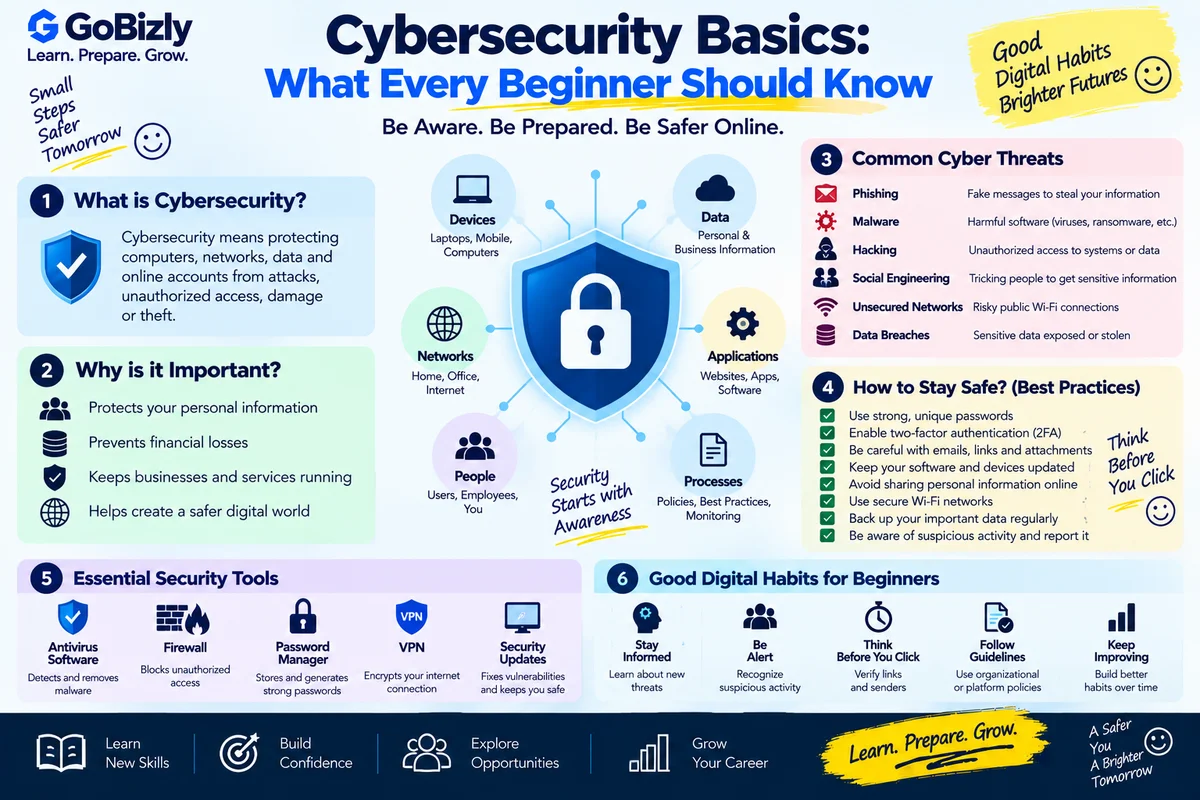
Cybersecurity Basics: What Every Beginner Should Know
Cybersecurity Basics: What Every Beginner Should Know
Cybersecurity is not only a topic for security professionals.
Students, employees, businesses and everyday internet users all interact with systems that need protection.
Basic cybersecurity knowledge can help you understand risks involving:
Accounts
Devices
Networks
Applications
Data
Online communication
Let's explore some important concepts.
1. What Is Cybersecurity?
Cybersecurity is the practice of protecting systems, networks, applications and information from unauthorized access, misuse, disruption or damage.
It involves both technology and human behavior.
2. Understand the CIA Triad
A common cybersecurity model is the CIA triad:
Confidentiality
Only authorized people should access information.
Integrity
Information should remain accurate and trustworthy.
Availability
Authorized users should be able to access systems and information when needed.
These three principles provide a useful foundation for understanding security.
3. Use Strong Passwords
Avoid easily guessed passwords such as:
Name
Birthday
Simple number sequences
Common words
Use unique passwords for important accounts.
A password manager can help manage multiple unique passwords.
4. Enable Multi-Factor Authentication
Multi-factor authentication adds another verification step beyond a password.
Depending on the service, this may involve:
Authentication apps
Security keys
One-time codes
Biometrics
MFA can provide additional protection if a password is compromised.
5. Understand Phishing
Phishing attempts try to trick people into revealing information or taking an unsafe action.
They may appear through:
Email
Messages
Fake websites
Social media
Phone calls
Be cautious when a message creates urgency or requests sensitive information unexpectedly.
6. Check Links Before Clicking
Before opening an unfamiliar link, examine:
Domain
Spelling
Context
Sender
Destination
Don't assume a link is safe simply because it contains a familiar logo.
7. Understand Malware
Malware is malicious software.
Categories can include:
Viruses
Worms
Trojans
Ransomware
Spyware
Different types behave differently, but the general objective is unauthorized or harmful activity.
8. Keep Software Updated
Software updates can include:
Security patches
Bug fixes
Performance improvements
New features
Keeping systems updated is an important security practice.
9. Protect Your Devices
Use appropriate security controls such as:
Screen locks
Device passwords
Security software
Software updates
Secure backups
Don't leave important devices unlocked in public environments.
10. Understand Encryption
Encryption transforms information into a form that is difficult for unauthorized parties to understand without the appropriate key or mechanism.
Encryption is widely used to protect:
Data
Communications
Stored information
Different encryption methods are used for different purposes.
11. Authentication vs Authorization
These concepts are different.
Authentication
Who are you?
Authorization
What are you allowed to access?
For example, logging into an application is authentication.
Having permission to view a particular report is authorization.
12. Use Access Controls
Users should generally receive the access required for their responsibilities.
This concept is often called least privilege.
Avoid granting unnecessary permissions.
13. Be Careful With Public Wi-Fi
Public networks can introduce security considerations.
When using public Wi-Fi:
Avoid sensitive activity when appropriate
Verify the network
Use secure connections
Keep device security enabled
Organizations may provide additional security tools such as VPNs depending on their policies.
14. Back Up Important Data
Backups can help recover from:
Device failure
Accidental deletion
Malware
Other unexpected events
Keep important backups protected and test that they can actually be restored.
15. Protect Personal Information
Be careful about sharing:
Passwords
Authentication codes
Financial information
Sensitive documents
Personal account details
Only provide sensitive information through legitimate channels when necessary.
16. Learn Social Engineering
Social engineering targets people rather than only technical systems.
Attackers may use:
Urgency
Fear
Authority
Trust
Curiosity
to influence someone into taking an unsafe action.
Pause and verify unusual requests.
17. Understand Security at Work
Professional security can involve:
Access control
Email security
Device management
Data protection
Security policies
Incident reporting
Follow your organization's security policies.
18. Know What to Do After a Security Incident
If you suspect an account or device has been compromised:
Follow the organization's incident process where applicable.
Change affected credentials through trusted channels.
Report the incident.
Review account activity.
Follow recommended recovery steps.
Don't hide an incident because you're worried about making a mistake.
Early reporting can help organizations respond.
19. Learn the Basics Before Advanced Security
If you're interested in cybersecurity as a career, begin with:
Networking
Operating systems
Linux fundamentals
Web technologies
Authentication
Cryptography basics
Security concepts
Then move toward specialized areas.
20. Keep Learning
Cybersecurity changes as technology changes.
Follow reliable security resources and continue learning about:
New threats
Security practices
Defensive technologies
Privacy
Authentication
Cloud security
Avoid testing security tools against systems you don't own or have explicit permission to assess.
Cybersecurity Checklist
☐ Use unique passwords
☐ Enable MFA
☐ Recognize phishing
☐ Check suspicious links
☐ Keep software updated
☐ Protect devices
☐ Understand encryption
☐ Understand authentication
☐ Understand authorization
☐ Use appropriate access controls
☐ Back up important data
☐ Protect sensitive information
☐ Learn social engineering risks
☐ Follow workplace security policies
☐ Report suspected incidents
Conclusion
Cybersecurity doesn't begin with advanced technical tools.
It begins with understanding basic security principles and developing good habits.
Protect your accounts.
Question unusual requests.
Keep systems updated.
Use appropriate access controls.
Back up important information.
And continue learning.
Good security starts with awareness, preparation and responsible behavior.
Learn. Prepare. Grow.